Access requests belong where the team already works

Most access request "systems" are a scavenger hunt. Ticket portal for some tools. Slack DM for others. A spreadsheet for the weird ones. Someone with admin rights eventually clicks Approve in a console you do not have. The requester waits. The approver forgets. Onboarding docs live somewhere else.
The worst option is the DM. Access granted in a private DM leaves almost no trail. No clear record of when it was asked for, why it was needed, or who said yes. That is a time bomb for offboarding, incident response, compliance, and the 2am question: who has maintain on that repo?
The fix is not a prettier portal. Treat access request as a product lifecycle: catalog → route → grant → onboard. Put that lifecycle where the team already works. For a lot of orgs that is Slack. For eng teams living in GitHub, Issues can be the same product with a different skin.
I rebuilt this as a Slack Workflows access-request suite in a demo workspace (Bisviews LLC) and documented the flows with screenshots. Same shape as what we run for platform intake: searchable Workflows, a structured request form, specialized paths for cloud and channel join, confirmation DMs, and a Welcome grant that ships role plus onboarding in one message.
That Slack suite is one intake surface. The same product idea (who, what role, why, who approves, audit trail) also fits GitHub for repo and org access. This sits next to how we think about GitHub access as code. That post is control plane. This one is the human intake surface, whether the form lives in Slack or as an Issue.
The hole you are filling
Need Datadog. Or Figma. Or write on a private repo. Or a private ops channel. Or a seat in our AWS account. Options people actually use:
- Open a ticket in a portal nobody opens unless forced.
- Ping the person who last granted something similar. Often in DM.
- Ask in a channel and hope the right owner sees it.
Days disappear. The "audit trail" is a chat scroll that expires, or a DM nobody can search later. Contractors skip training notes because nobody asked. When the grant finally lands, there is no link to "what do I do next," so you get a second ping: "I have access, where do I start?"
Contrast that with anything that leaves a trail: a Slack Workflow submission, a GitHub Issue with a template, a ticket with named approvers. Same questions get answered either way. The difference is whether you can reconstruct the grant six months later without digging through someone's DMs.
Identity backends (Okta, IAM, SCIM) and ticket systems may still run underneath. They are not the product the engineer sees. The product is: who needs what, why, who decides, what they got, how they start.
Put intake where the team already works
Two surfaces show up in the rest of this post. Slack Workflows for SaaS, dashboards, cloud accounts, and gated channels. GitHub Issues for repo roles and org or team membership. Same product idea on both: who, what role, why, who approves, audit trail.
We run Slack for SaaS and dashboards, Issues for GitHub and org access. Pick one system of record per slice and stick to it. What we refuse is "hey can you add me" in a DM as the default path for either.
Slack Workflows as an access-request surface
For SaaS and dashboards, I built this as Slack Workflows under Agents & tools, not a custom bot. Searchable list. WORKFLOW tag. Start opens a form toast ("Collecting info in a form"). Cancel gives a clean "Workflow canceled." Native chrome. No side portal login.
That choice matters for adoption. Engineers already live in Slack for day-to-day chat. If the request form is three clicks from search, they will use it. If it is another SSO app they open twice a year, they will DM you instead.
Entry points in the suite:
- Submit access request: generic catalog path ("Submits an access request.")
- A specialized AWS submit workflow (easy to spot in the list)
- A channel join workflow for a sensitive ops channel (approve or deny, then confirm)
Same surface. Different request shapes. That split is deliberate. Slack does not have to own every request type. Eng teams that already live in GitHub more than Slack for repo work can put that slice on Issues instead. The Slack suite still owns the catalog-shaped requests: SaaS seats, cloud accounts, gated channels.
The Slack form, catalog, and specialized flows
The form is the product
The generic Slack modal is titled Access request. Close / green Submit. Four fields. That is the whole catalog UX.
| Field | What it encodes |
|---|---|
| User | Defaults to you. Help text: select who needs access; self or another user. Request-for-teammate is first-class. |
| System | Dropdown catalog, not free text. One clear label per tool. |
| Role | Scoped to the system. Examples: Developer, Admin, Read-only, Maintainer. |
| Business justification | Free text. Explicit help for contractors: include the date you completed security and privacy training. |
Systems in the catalog were the usual platform mix: Figma, Databricks, Jira/Confluence, Datadog, a monitoring tool, Gemini-class AI tooling, plus a test system for dry runs. Roles for something like Datadog were simple and operational: Developer, Admin, Read-only, with maybe an incident-responder flavor. AI tooling might split User vs Admin. The pattern is the point: system first, then role, then why.
If you only remember one design rule from this post: do not ask "what do you need?" as a blank box. Force the catalog. Free text is how you end up provisioning the wrong Datadog team and calling it done.
One catalog is not enough
Generic Submit access request covers SaaS and shared tools. Cloud accounts and gated channels are different animals. Repo permission upgrades and org membership are different again (those belong on the GitHub surface below).
The specialized AWS path had its own workflow and confirmation copy aimed at that account. A channel-join flow existed as a separate workflow with approve/deny in the description. Same discovery list. Different product shapes.
Match the request shape to the resource. Stuffing AWS account grants and "add me to #incident-war-room" into one mega-form usually means worse routing and worse audit language. Specialized workflows keep the catalog honest without making every request look like a SaaS seat. Specialized Issue templates do the same job for GitHub: one template for "repo role change," another for "add me to team X," not a blank Issue titled "access please."
GitHub as an access-request surface
Eng teams already treat GitHub as the workplace for code. Repo access and org membership belong there as requests, not as side-channel DMs to whoever has admin.
The request shapes are familiar if you have ever managed an org:
- Repo access: read → triage → write → maintain → admin upgrades. The requester names the repo, the target role, and why (not "give me access").
- Org / team membership: add or remove someone from a team that carries repo grants with it. Same fields: who, which team, why, who owns the decision.
The product idea is identical to the Slack form: who, what role, why, who approves, audit trail. You do not need a custom product to stand that up. Practically it can live as:
- Issue templates that force repo (or team), role, justification, and requester.
- CODEOWNERS or named approvers so the right humans get pinged, not whoever happens to be online.
- Org automation (Actions, apps, or existing provisioning) that reacts to an approved Issue or a labeled state. Keep the human decision on the Issue; let automation do the click if you already have it.
I am not shipping a custom GitHub access portal here. The point is the surface: if the team already works in Issues and PRs, put intake there so grants are searchable, closable, and reviewable the same way other eng work is.
GitHub Issues for eng access requests
A minimal Issues-based flow looks like this:
- Template asks for repo or team, requested role, justification, and whether this is self or for someone else.
- Labels mark type (
access-request,repo,org-team) and state (pending-approval,granted,denied). Assignees or a project board route to the owners who actually decide. - Close means grant or deny, with a comment trail that says what was done and why. The Issue is the record. No second scroll in a DM.
That fits teams that already live in GitHub more than Slack for eng work. It also coexists cleanly with a Slack suite: Slack Workflows for Datadog / Figma / AWS-style catalogs, Issues for GitHub repo and org access. Either can be the system of record for its slice. Both beat "hey can you add me" in a private thread.
If you already have access as code for the control plane, Issues become the human change request that feeds the PR or the admin action. Intake and enforcement stay separate. That is the same split as Submit vs Approval vs Welcome in Slack.
After Submit: no black hole
Post-submit on the Slack path, the requester gets a DM from the submit workflow. Pattern (anonymized):
You requested that @user be added to AWS.
System role: Admin
Request notes (if any): …
This request has been routed to the business leads for approval.
Who. Target. Role. Notes. Named routing. That last line is expectation management. "Submitted" without "routed to X" is how people re-ping in twenty minutes.
On Issues, the equivalent is the Issue itself: assignee, label, optional project column. The requester can watch the thread. Approvers comment in public (to the org) instead of whispering yes in a DM. Same expectation management, durable by default.
I did not capture the full Slack approver message body in the recordings. The suite listed an Access request - Security approval app in the sidebar. Architecturally: submit and approval are separate stages. Speak to that split. Do not fake Approve/Deny button copy you never saw.
Grant is not a yes emoji
Approval without a Welcome message is half a product. The Access request - Welcome app DM looked like this in spirit:
Your access to AWS has been granted.
Your system role is: Admin
Your access is governed by the IT Rules of Behavior.
You can get started with your onboarding here: AWS onboarding link
Same pattern for Datadog or Figma grants: system + role, Rules of Behavior line, onboarding link. Access and next step in one place. That kills the second ticket ("I have access, now what?").
On GitHub, the close comment (or a follow-up Issue comment) can carry the same payload: role granted, link to onboarding or contributing docs, pointer to the team or CODEOWNERS path. A closed Issue with "granted write on org/repo" is a better artifact than a thumbs-up emoji in a DM.
Compliance copy on grant is cheap and useful. Put the behavioral rules where the human is celebrating, not only in a PDF they never opened during intake.
Split the stages on purpose
Under Agents & apps the Slack suite was modular:
- Submit access request
- Access request - Security approval
- Access request - Welcome
- Specialized submit (AWS)
- Plus adjacent Apps directory entries for Jira ticket create / parse (local apps), separate from the Workflows path
Why split Submit / Approval / Welcome (or open Issue / approve / close-with-grant):
- Permissions. Requesters should not see approver chrome. Approvers should not get Welcome spam.
- Noise. Grant messages are rare and high signal. Keep them out of the request channel clutter.
- Ownership. Catalog and form copy can evolve without rewriting grant templates. Security can own approval routing without owning onboarding links.
Underneath, you may still create a Jira ticket or call an IdP. Some orgs run a parser that extracts user and system from messages. Fine. The win for the engineer is still a visible lifecycle with a trail, not which backend queued the grant.
How I built the Slack Workflows
Below is how I stood up the Submit path (and optional Approval / Welcome stages) in Slack. Slack UI labels move. If Agents & tools is missing, look for Tools or Automations under More. Steps match Slack's current Workflow Builder docs (paid plans; owners/admins may restrict who can create workflows).
Screenshots are from my demo rebuild. Workspace name (Bisviews LLC) is fine to leave; redact coworker emails or private channel names if you publish your own captures.
Prerequisites
- A paid Slack workspace (Pro, Business+, or Enterprise). Workflow Builder is not on free Slack.
- Permission to create workflows. Default is all members. If New / Build Workflow is missing, ask an owner or admin.
- A private channel for approvers (example:
#access-approvals) if you want routing visible outside DMs. Optional for a first dry run.
Plan note: interactive Approve / Deny that truly branch (and steps like Add a branch / Repeat) are marked Business+ in Discover. On Pro I still shipped Submit + confirmation DM + a plain channel ping; use Open link buttons or a separate approval workflow if you lack branching.
Stage 1: Submit access request
1. Open Workflow Builder
- Desktop Slack → sidebar Agents & tools (or Tools / Automations).
- Open Workflows.
- Top right: New → Build Workflow.
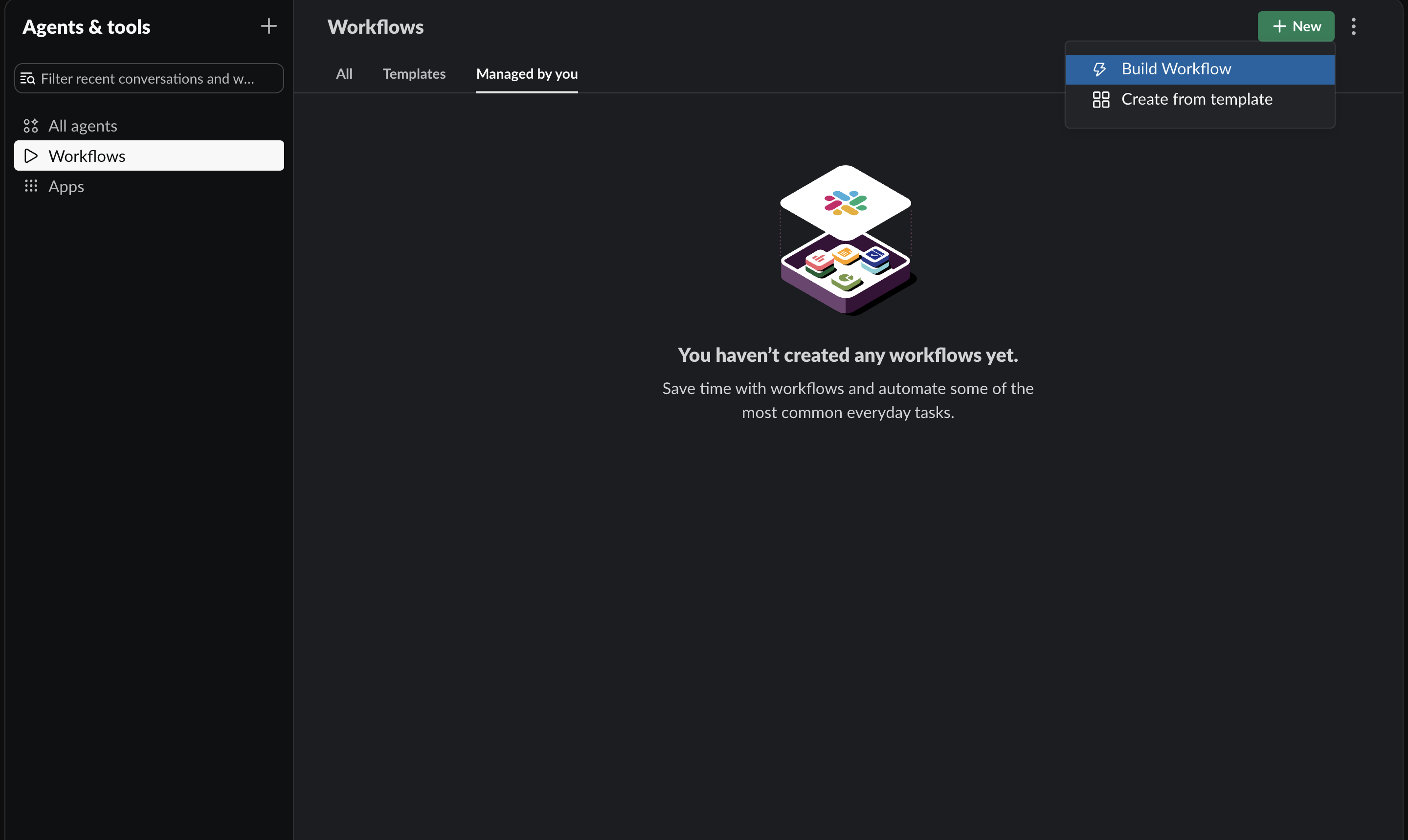
Workflows gallery → New → Build Workflow.
2. Start from a link
- Under Start the workflow, click Choose an event.
- Select From a link in Slack (starts on a click inside Slack).
- Click Continue.
Link triggers only start inside Slack. Pasting the URL in a browser or email will not run the workflow.
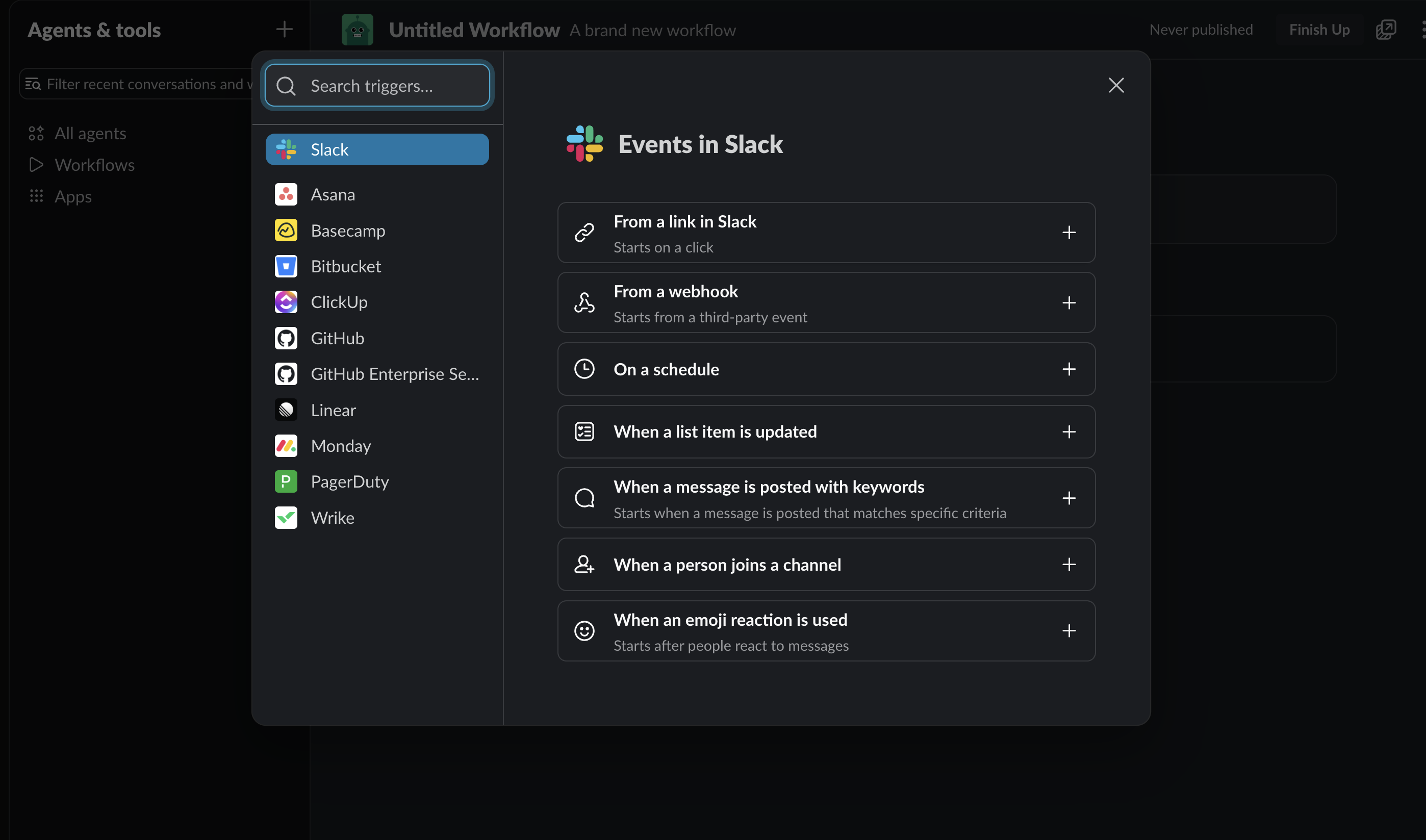
Trigger picker: choose From a link in Slack.
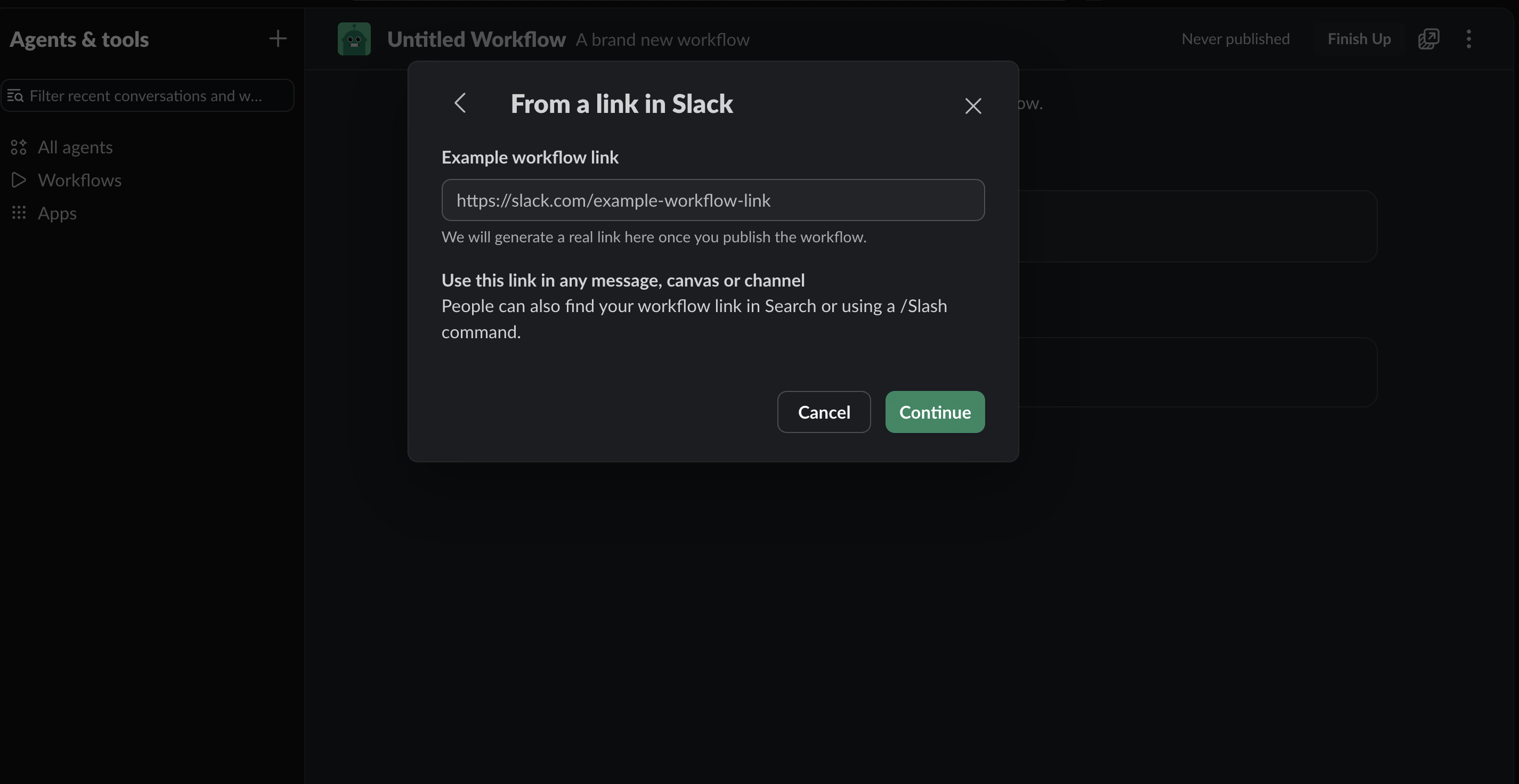
Confirm the link trigger, then Continue. Slack generates the real link after you publish.
3. Collect the Access request form
- Add a step → Forms → Collect info in a form.
- Form title: Access request.
- Add four questions (mark required unless noted):
| Question | Question type | Hint / options |
|---|---|---|
| User | Slack user | Who needs access. You or someone else. |
| System | Dropdown | Catalog, not free text. Examples: AWS, Datadog, Wazuh, Jira, Figma. |
| Role | Dropdown | Scoped labels. Examples: Developer, Admin, Read-only, Maintainer. |
| Request justification | Paragraph | Why this access. Hint for contractors: include security/privacy training date. |
- Preview form, then Save.
Do not use a blank "what do you need?" box for System. The catalog is the product.
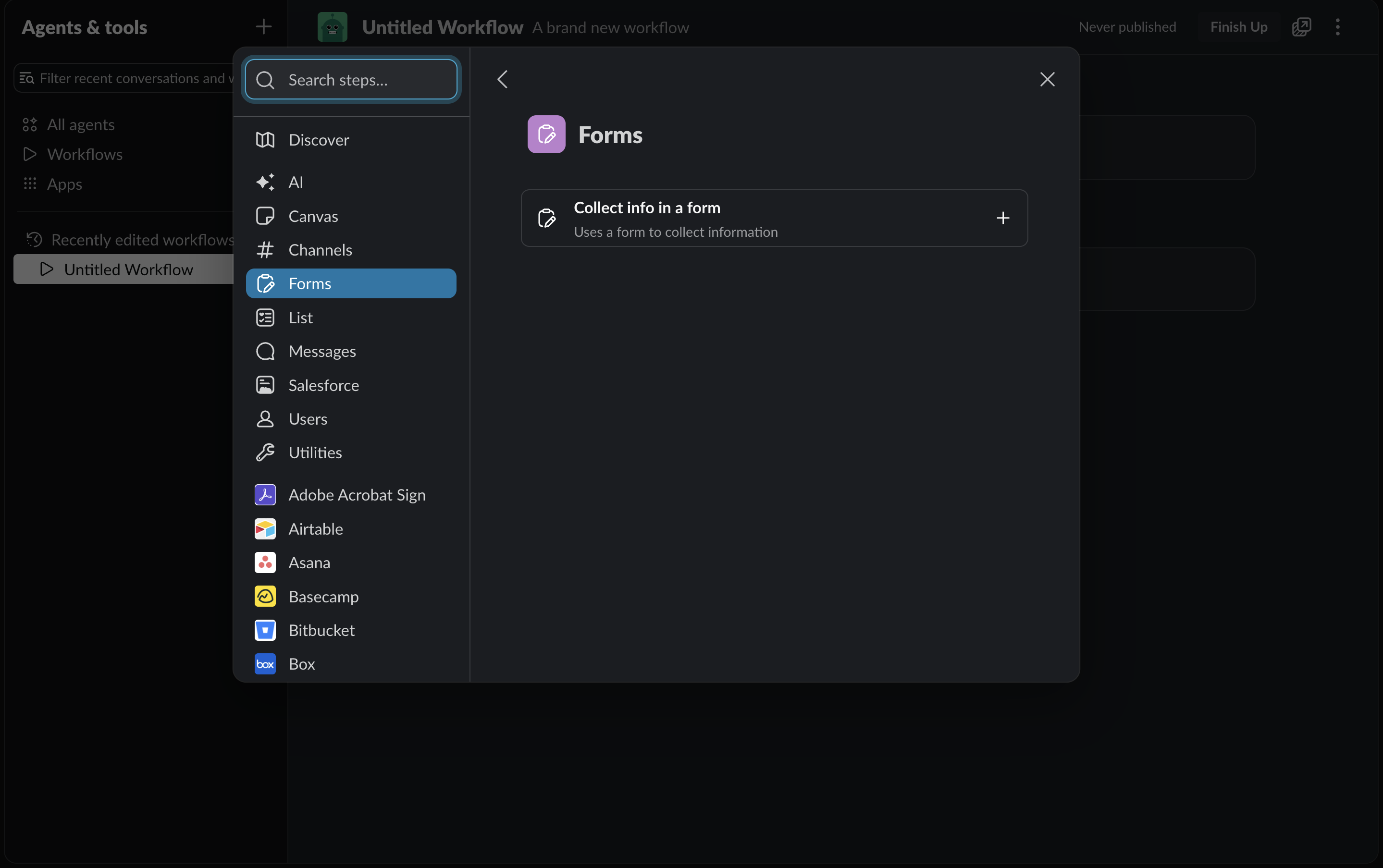
Add step → Forms → Collect info in a form.
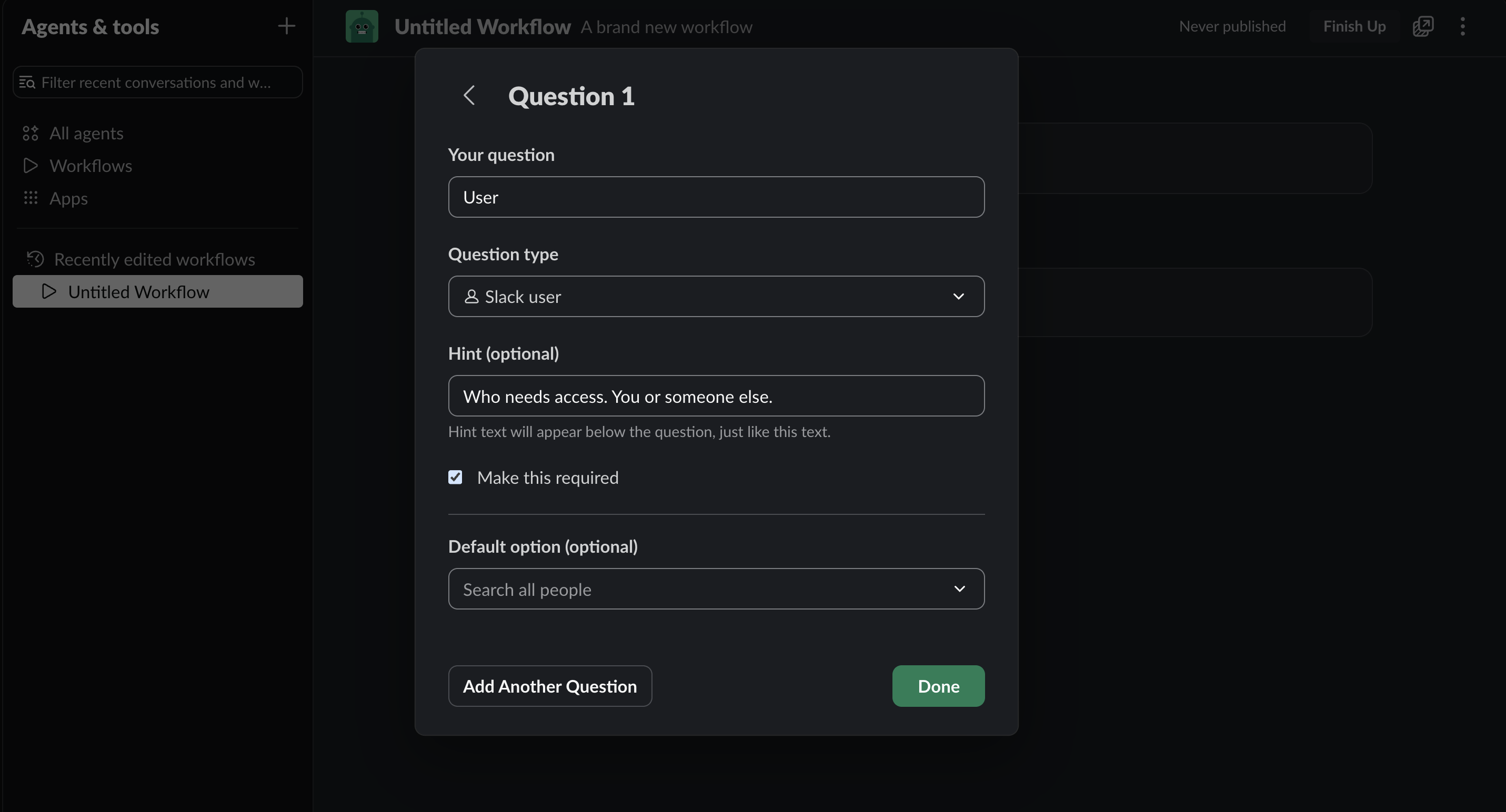
User as a Slack user field (self or teammate).
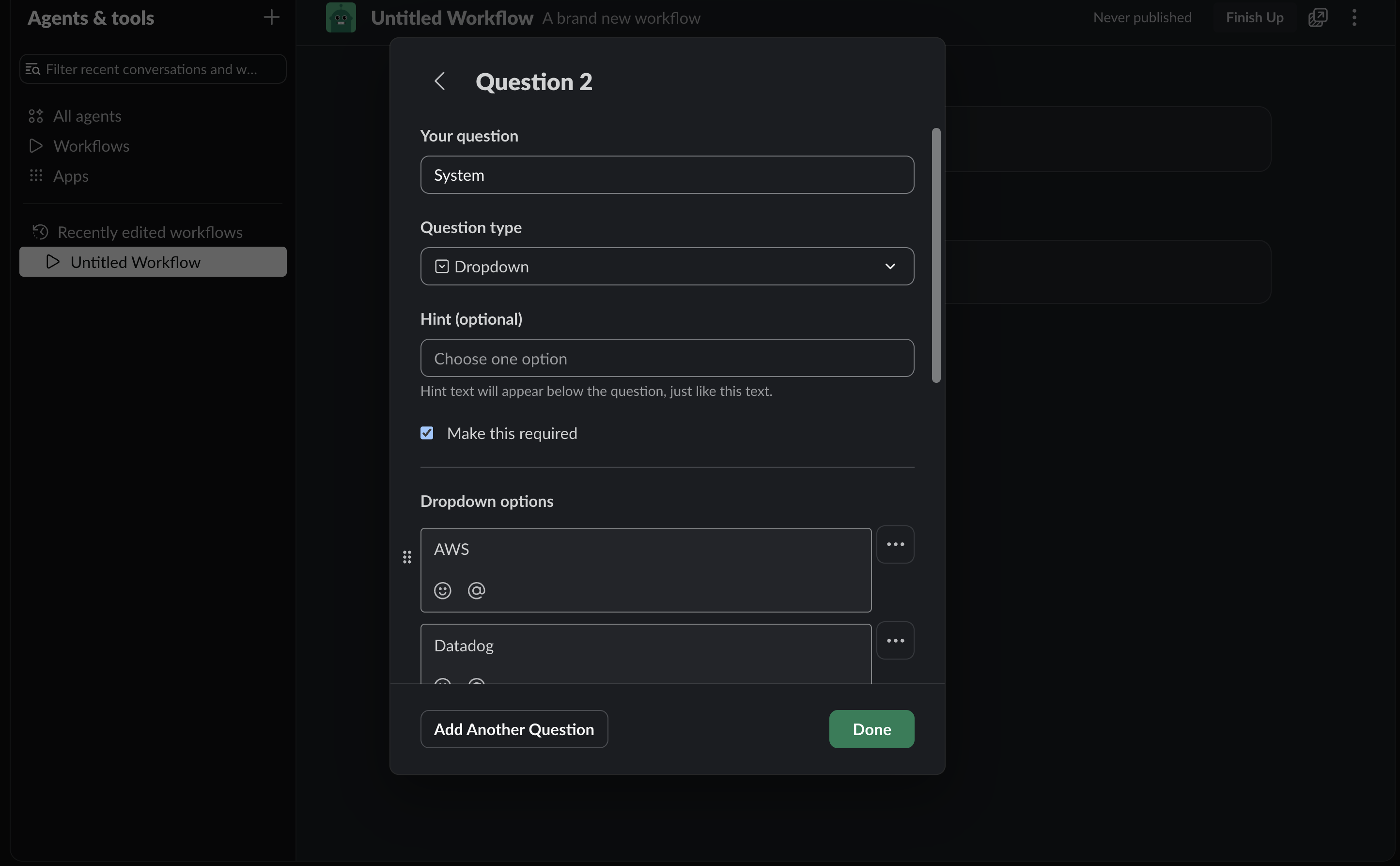
System as a dropdown catalog (AWS, Datadog, …), not free text.
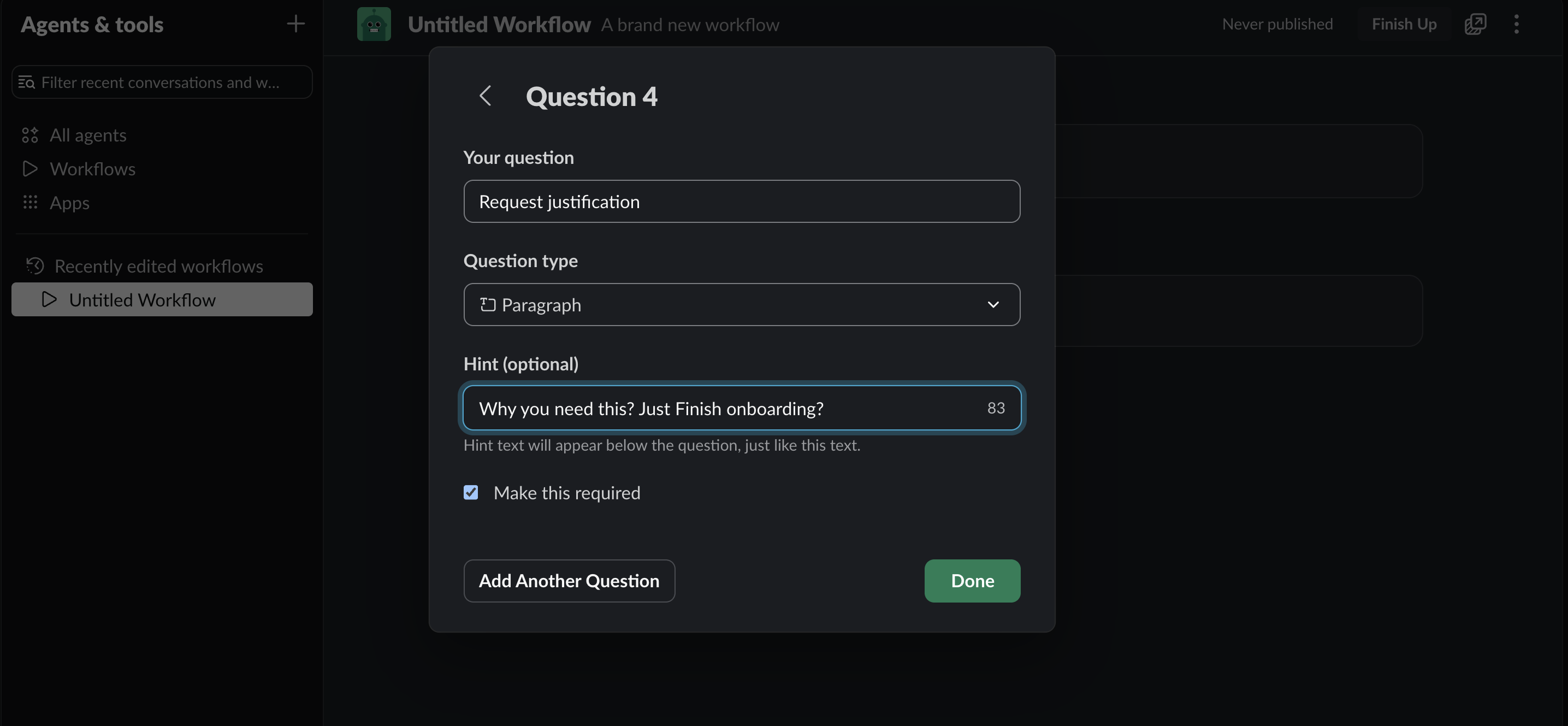
Request justification as a required paragraph.
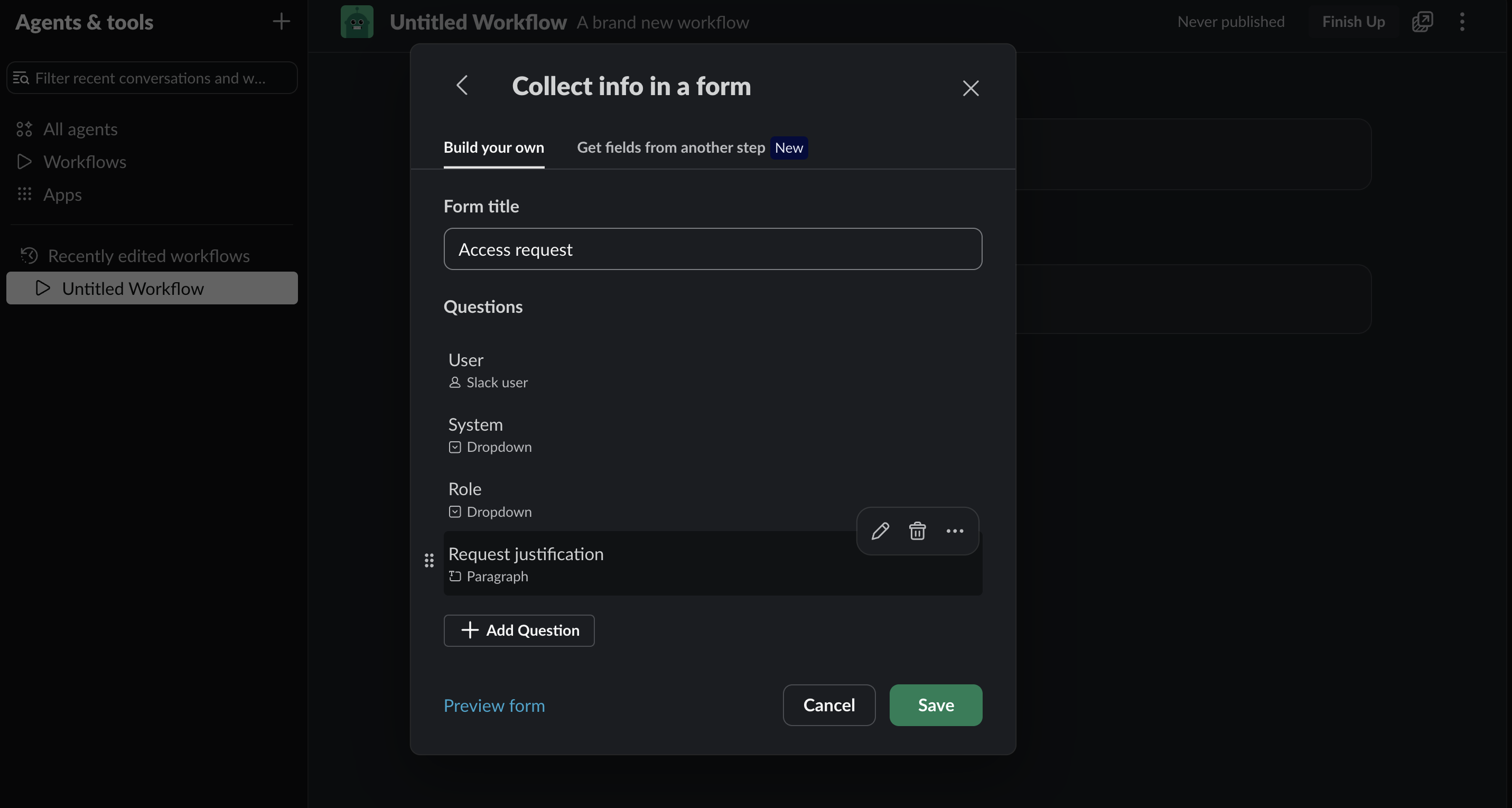
Form title Access request with all four fields, then Save.
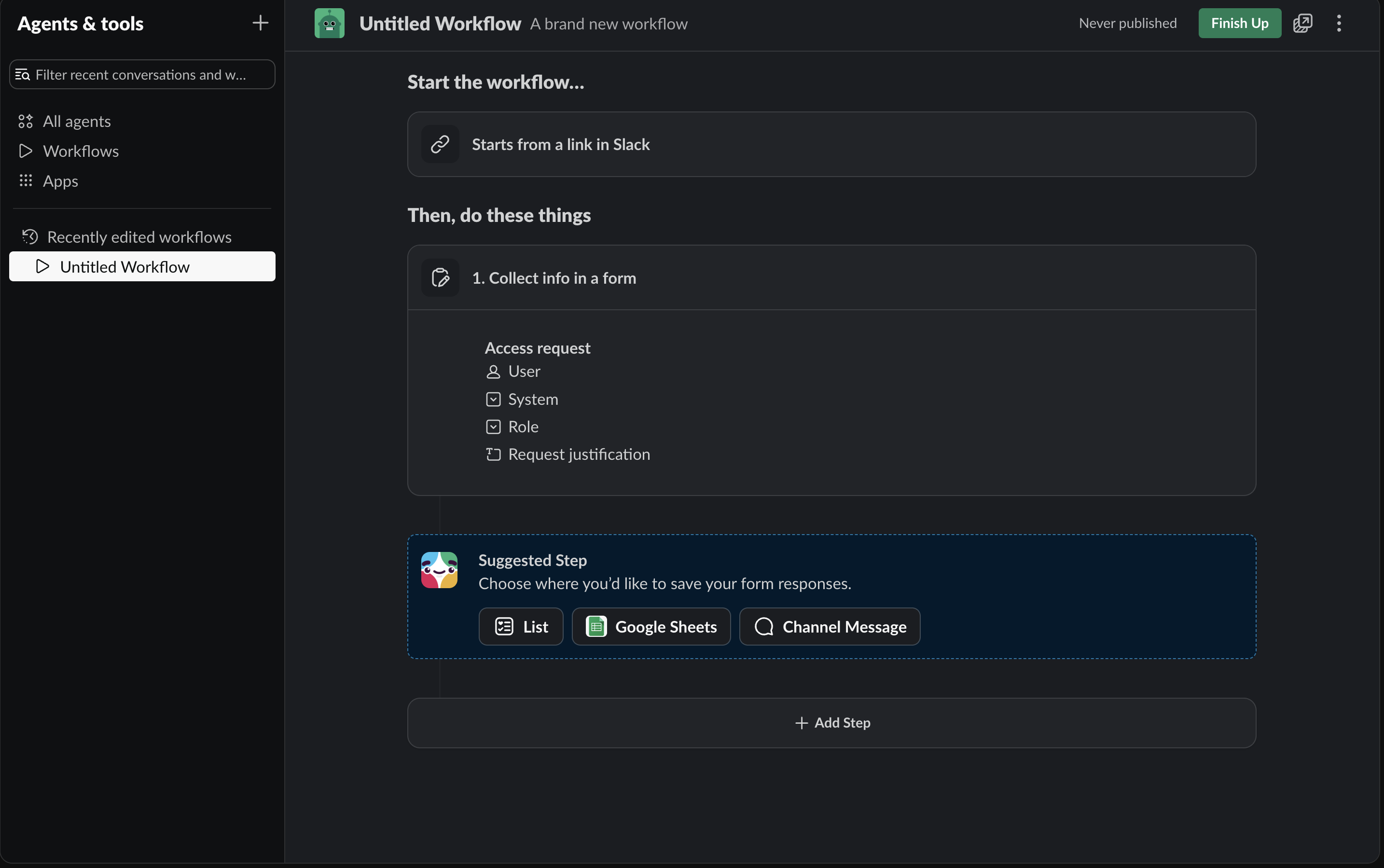
Canvas after save: link trigger + Access request form (User, System, Role, Request justification).
4. Confirmation DM to the requester
- Add a step → Messages → Send a message to a person.
- Recipient: insert variable Person who used this workflow (or Person who submitted the form).
- Message body, using Insert a variable for form answers:
You requested access for {User}.
System: {System}
Role: {Role}
Notes: {Request justification}
This request has been routed to the IAM and Access control team for approval.
- Save.
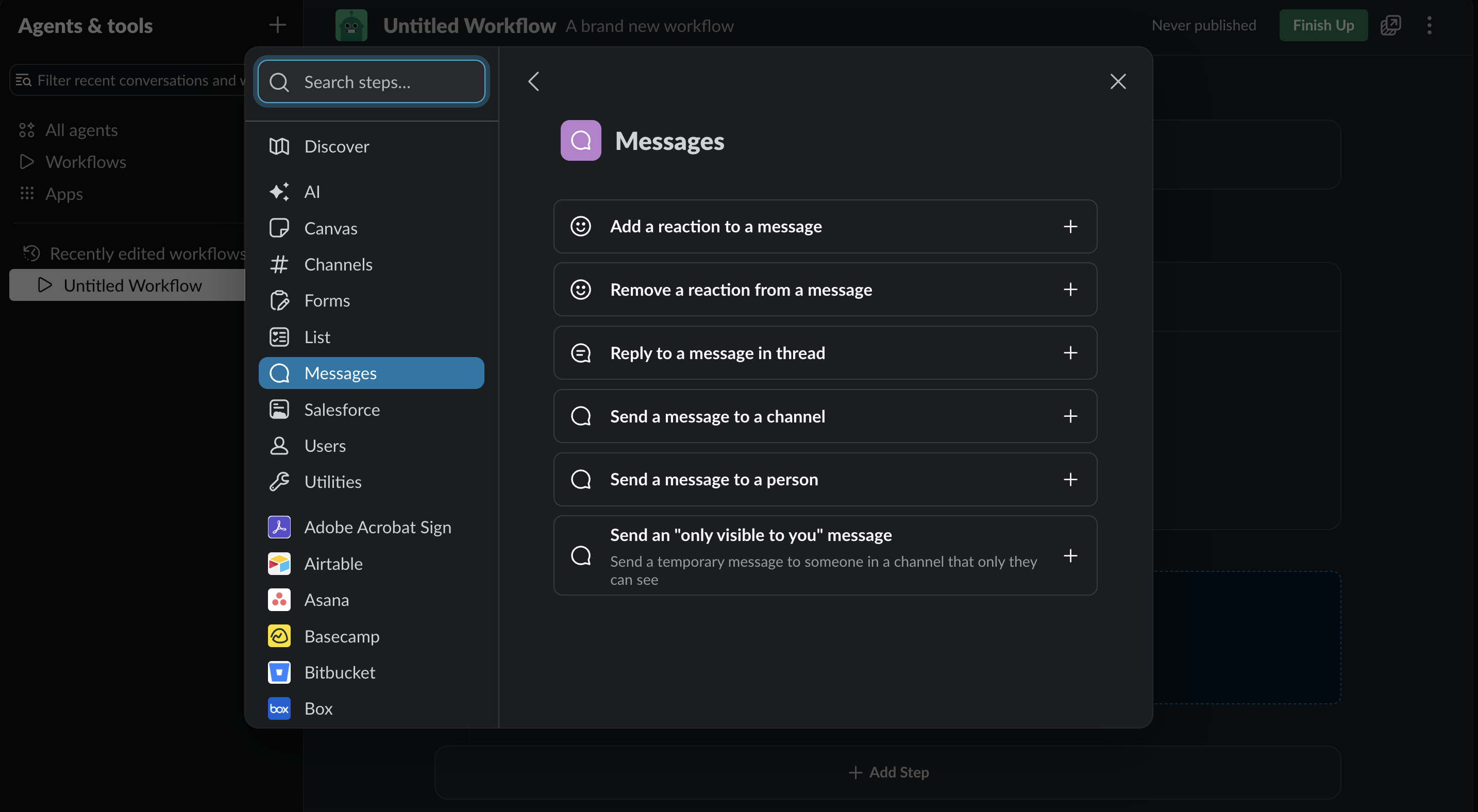
Add step → Messages → Send a message to a person.
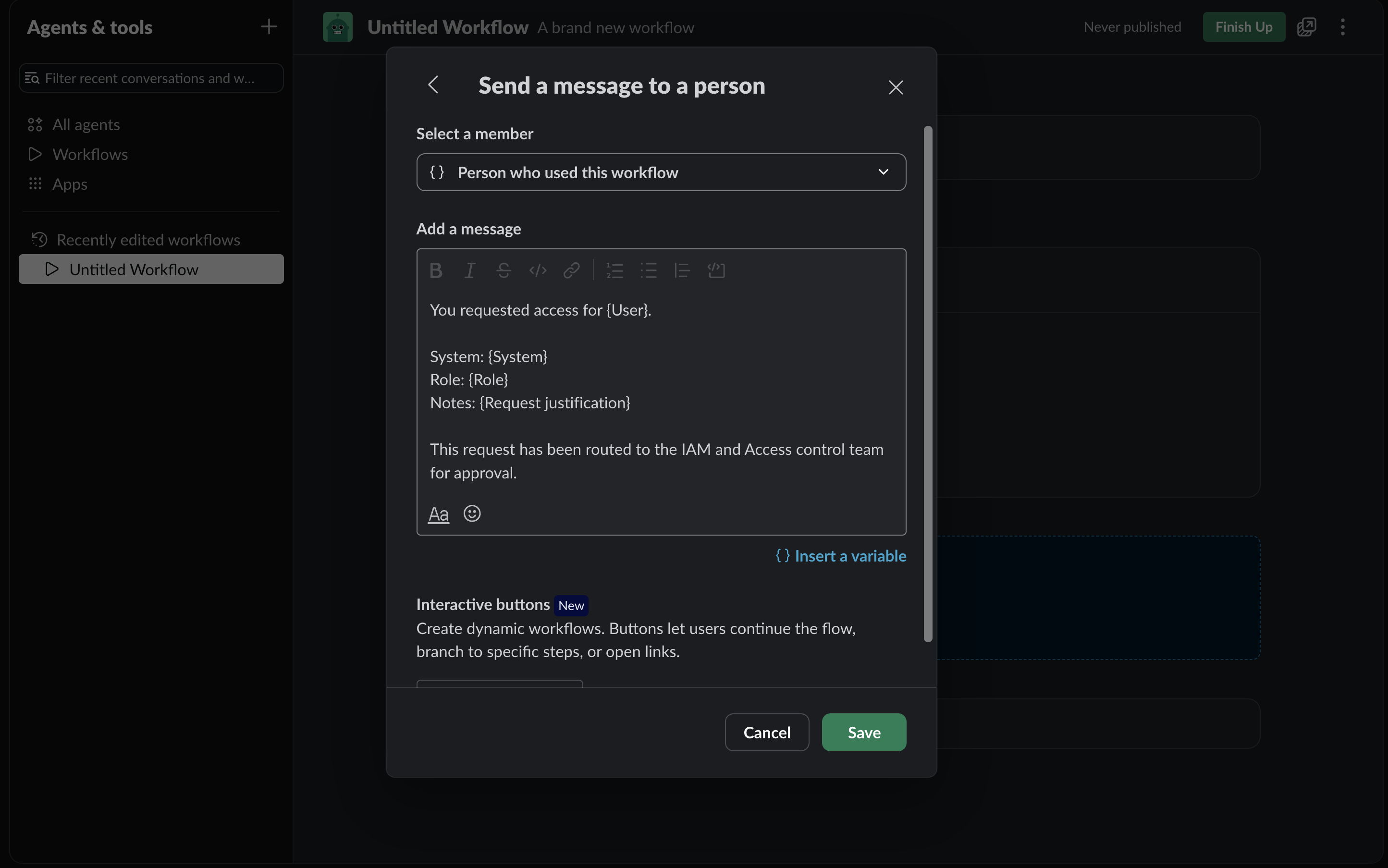
Confirmation DM: variables for User / System / Role / justification, plus routing copy.
5. Route to approvers (channel or people)
For v1 I used one of:
- Channel: Send a message to a channel →
#access-approvals(or similar). Same variables plus who submitted. - People: another Send a message to a person to a fixed approver, or a form question "Approver" (Slack user) and message that person.
I kept Approve/Deny out of this workflow so the permission split from the design section stays clean. Routing text is enough for Submit. If you add buttons here, see the Business+ note under Optional stage 2.
6. Name, permissions, publish
- Set workflow name: Submit access request. Description:
Submits an access request. - ⋯ → Settings if you need to limit who can find and use it.
- Finish Up → review → Publish.
- Copy link. Share it in an onboarding channel or canvas so people can Start it. It also appears in the Workflows gallery and search.
7. Live run (form end-user sees)
Start the published workflow. Expect the Access request modal (Close / green Submit), then the confirmation DM.
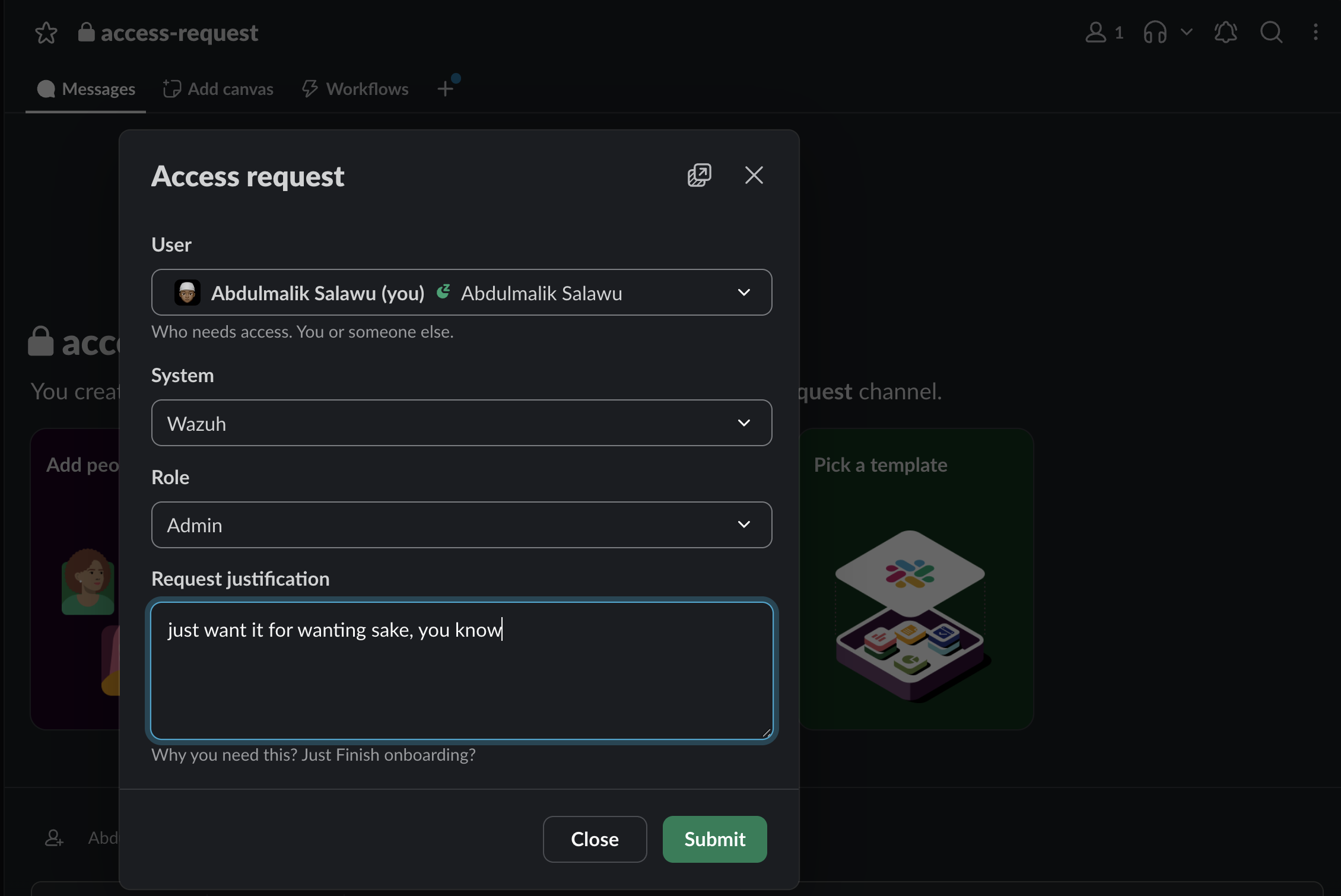
Live form: User, System, Role, Request justification, then Submit.
Optional stage 2: Approval workflow
I kept this as a separate workflow so requesters never see approver chrome. You can also attach Approve / Deny buttons on the Submit channel message; true branching after those buttons is the part that bumps into Business+.
- New → Build Workflow → start From a link, or have the Submit channel message use Add button → Start another workflow pointed at this one.
- Minimal shape: message to the approver (or a channel) with request summary variables, plus buttons (Approve / Deny). Use Single-click (and Mutually exclusive on the message) if only one decision should count.
- On continue: notify the requester (DM) with granted or denied; optionally kick the Welcome workflow (button behavior: start another workflow).
- Name it something like Access request - Security approval. Restrict who can find and use it to security / business leads in Settings.
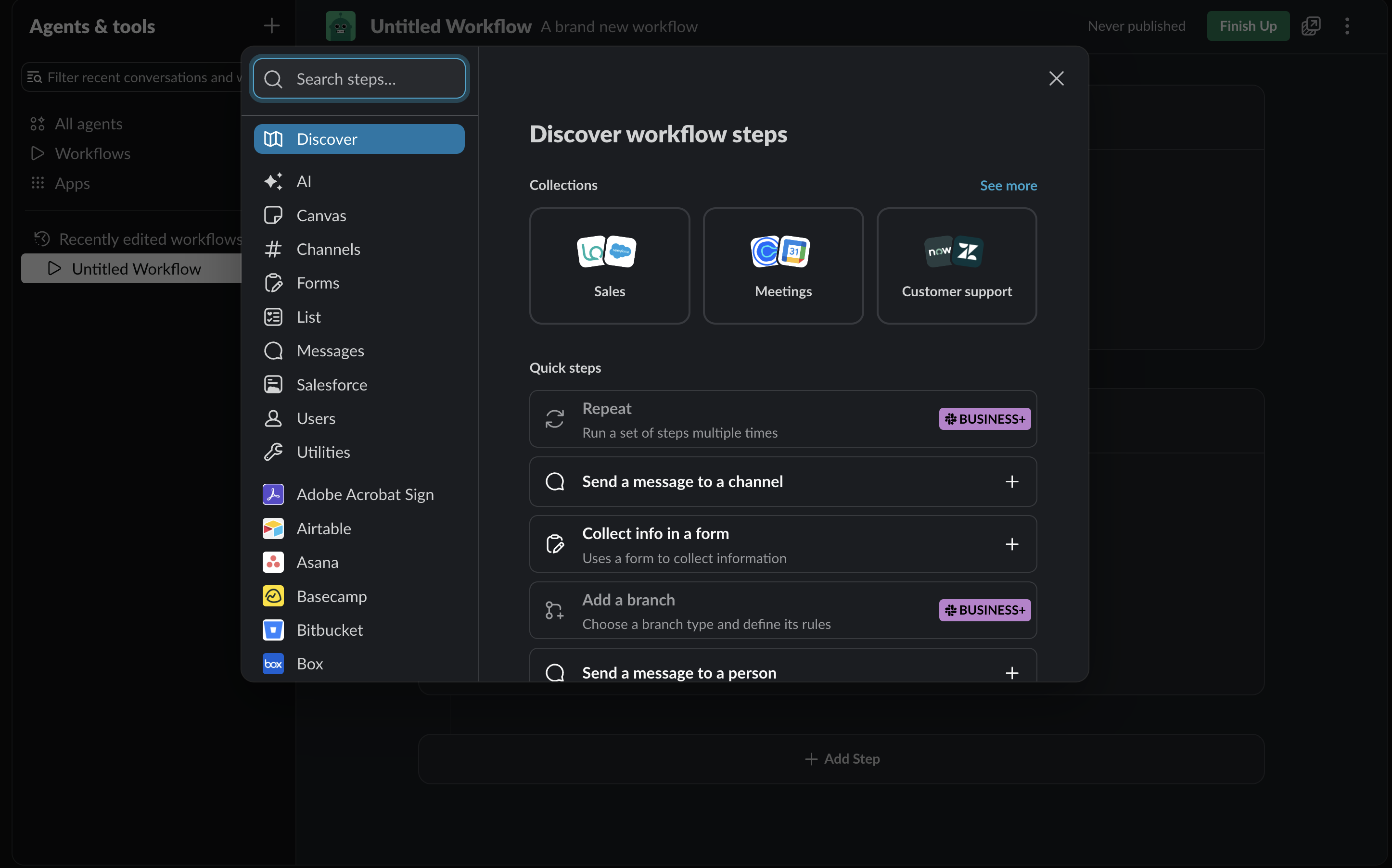
Business+ in Discover: Add a branch and Repeat are plan-gated. Conditional branching behind Approve/Deny often needs this tier.
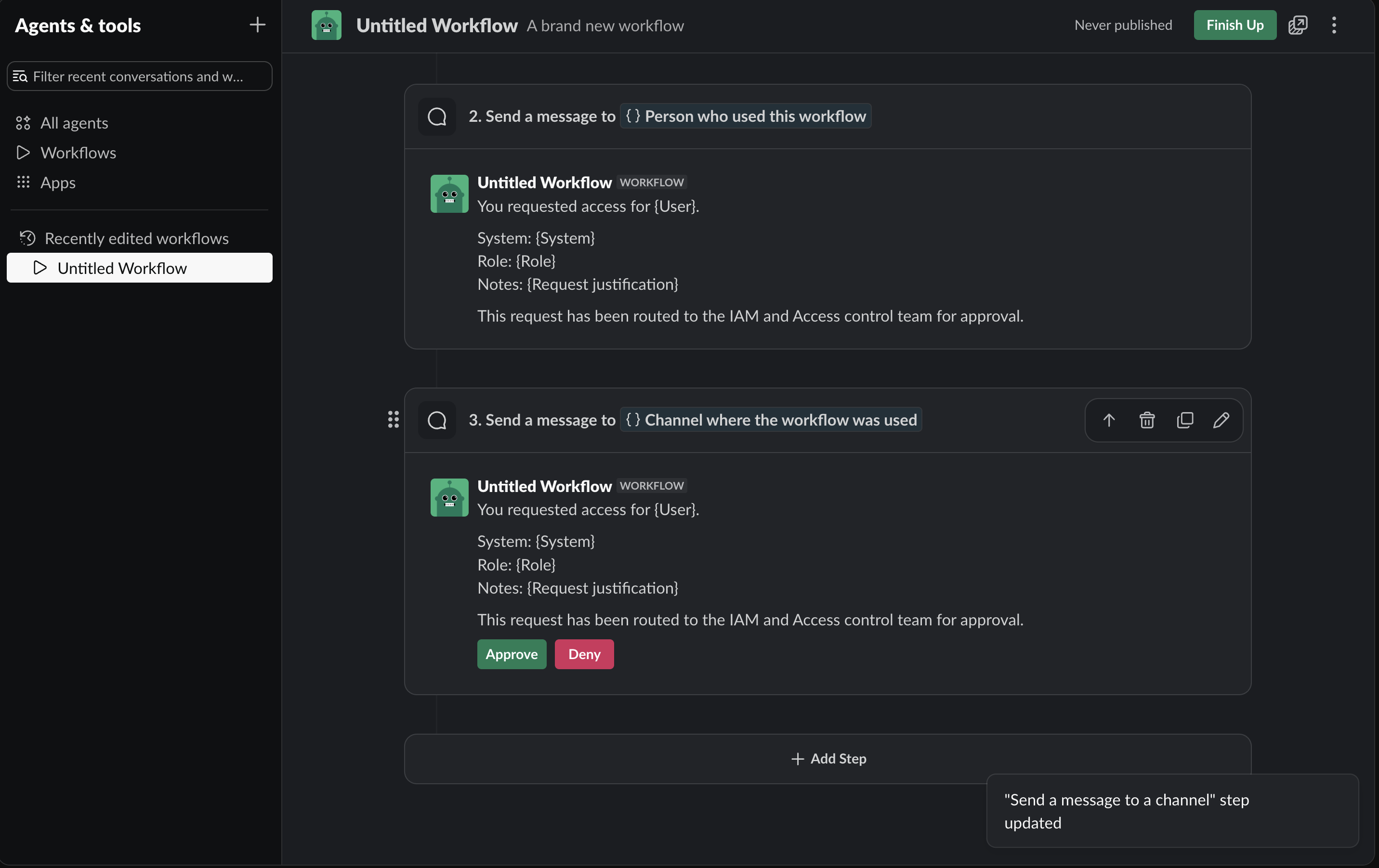
Canvas: confirmation DM (step 2) plus channel message with Approve / Deny (step 3).
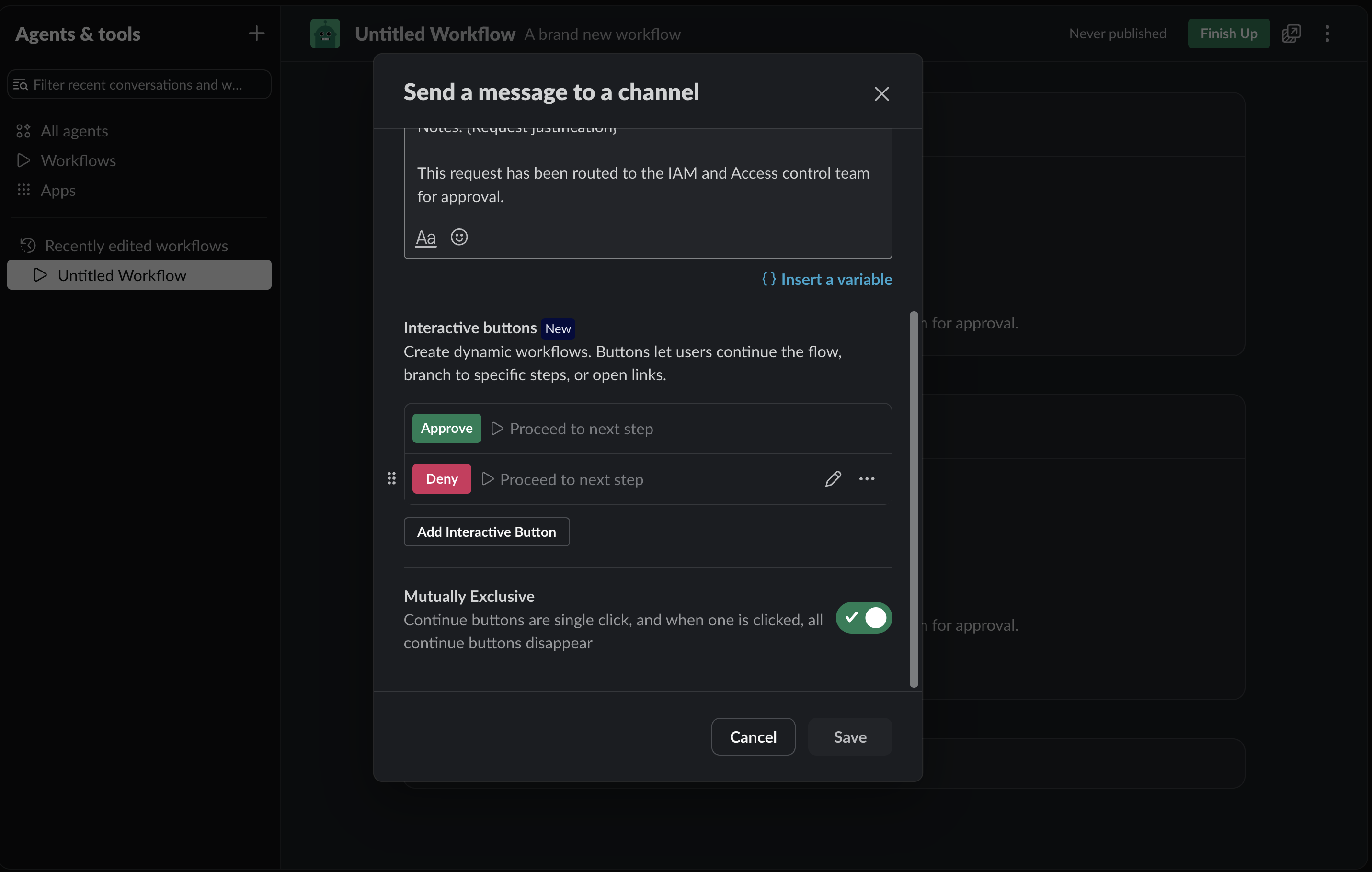
Channel message: interactive Approve / Deny, with Mutually exclusive so one click clears both.
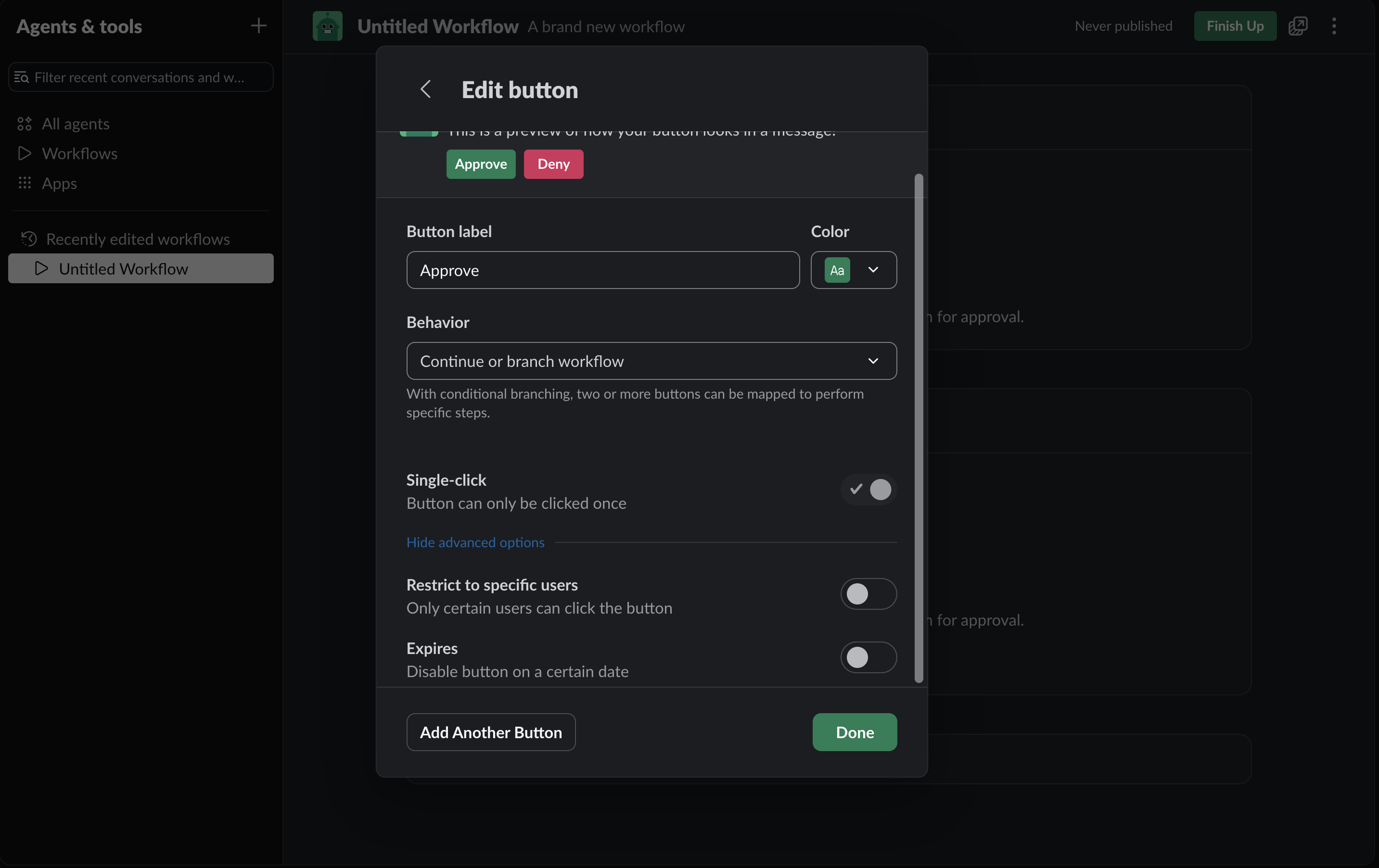
Edit Approve: behavior Continue or branch workflow, Single-click on. Mapping each button to a different path is where Business+ branching matters.
If branching is unavailable on the plan, ship Submit + Welcome first and leave approval as a human reply in the channel, or point buttons at Open link / start-another-workflow instead of inventing branch copy you cannot run.
Optional stage 3: Welcome (grant) workflow
- New → Build Workflow → From a link (started by approvers or by the approval workflow).
- Form or variables for System, Role, and User (Slack user) if humans paste grant details; or pass variables from the prior workflow when using "start another workflow."
- Send a message to a person → the grantee:
Your access to {System} has been granted.
Your system role is: {Role}
Your access is governed by the IT Rules of Behavior.
You can get started with your onboarding here: {onboarding link for that system}
- Name: Access request - Welcome. Publish. Keep it out of the noisy request channel.
Optional specialized Submit (AWS)
I duplicated the Submit workflow, renamed it something obvious in the gallery (example: Submit AWS access request), and narrowed the System dropdown to AWS (or hardcoded AWS in the confirmation copy). Same four-field idea, tighter catalog. Same pattern works for a gated channel-join flow later.
Dry-run checklist
What I ran before calling it done:
- Search for Submit access request → Start.
- Request Datadog / Developer for yourself with a short justification.
- Confirm the DM lands (who, system, role, notes, routed to…).
- Confirm approvers see the route message.
- Cancel once and confirm Slack shows a clean cancel state (no half-submitted ghost).
- If Welcome exists, run a grant to a test user and confirm onboarding link + role land in one DM.
That is enough surface area to ship the product lifecycle without building a custom bot.
Conclusion
Slack Workflows and GitHub Issues are delivery surfaces. The product is governed self-service:
- Catalog: system (or repo/team) + role + justification (with contractor training when it applies).
- Route: explicit owners (business leads, security, CODEOWNERS), not a void and not a DM.
- Grant: named role, not a vague "you are in."
- Onboard: Rules of Behavior + link in the same message or close comment.
That is process design. It is not "we built a Slack bot" and it is not "we bought another portal." Bots without a catalog become another DM queue. Portals without presence become graveyards. DMs without a trail become tomorrow's access mystery. Put the lifecycle where the team already works, keep stages split, refuse free-text systems, and stop granting access in private threads.
If your access story is still ticket-or-ping, start with the form fields above. Ship Submit and Welcome first if you have to. Wire approval as its own stage so permissions stay clean. For GitHub, start with an Issue template and a label. Measure time-to-grant and second-ping rate for "I have access, now what?" Those two numbers tell you whether you shipped a product or another inbox.