AWS Cloud Costs Nightmare, Cutting It To Elongate That Startup Runway

Cloud costs at early stage startups rarely spiral because of recklessness.
They spiral because the team was moving fast, the architecture made sense at the time, and nobody had the bandwidth to revisit it.
By the time the bill becomes a problem, the decisions are already baked in.
I have been on both sides of this, burning through it personally, and leading teams trying to unwind it before the runway ran out. Here is what has actually worked.
The first place to look is almost always NAT Gateways on non production environments.
Most staging and dev setups have multiple private subnets, each routing through its own managed NAT Gateway.
You are paying the hourly rate on all of them, plus per-GB data processing charges every time an EC2 instance pulls a dependency, a package update, or a Docker image from the internet.
It adds up quietly until it doesn't.
Replace NAT Gateways with fck-nat
For staging and development environments, replace standard AWS Managed NAT Gateways with fck-nat.
What is fck-nat?
It is the (f)easible (c)ost (k)onfigurable NAT! It offers ready-to-use ARM and x86 based AMIs built on Amazon Linux 2023 which can support up to 5Gbps burst NAT traffic on a t4g.nano instance.
How does it compare to a Managed NAT Gateway?
- Hourly rates: Managed NAT Gateway ($0.045/hr) vs
t4g.nano($0.0042/hr) - Per GB rates: Managed NAT Gateway ($0.045/GB) vs fck-nat ($0.00/GB)
Sitting idle, fck-nat costs only 10% of a Managed NAT Gateway. In practice, because there are zero per-GB data processing charges, the savings are even greater.
Why not use the AWS NAT Instance AMI? The official AWS supported NAT Instance AMI hasn't been updated since 2018, is running Amazon Linux 1 (which is now EOL), and has no ARM support, meaning it can't be deployed on EC2's most cost-effective instance types. fck-nat solves all these issues.
When should you stick to Managed NAT Gateways? AWS limits outgoing internet bandwidth on EC2 instances to 5Gbps. This means that the highest bandwidth fck-nat can support while remaining cost-effective is 5Gbps.
This covers a very broad set of use cases, but if your workload requires more internet egress bandwidth, you should stick to Managed NAT Gateways.
One Load Balancer Per Environment, Not One Per Service
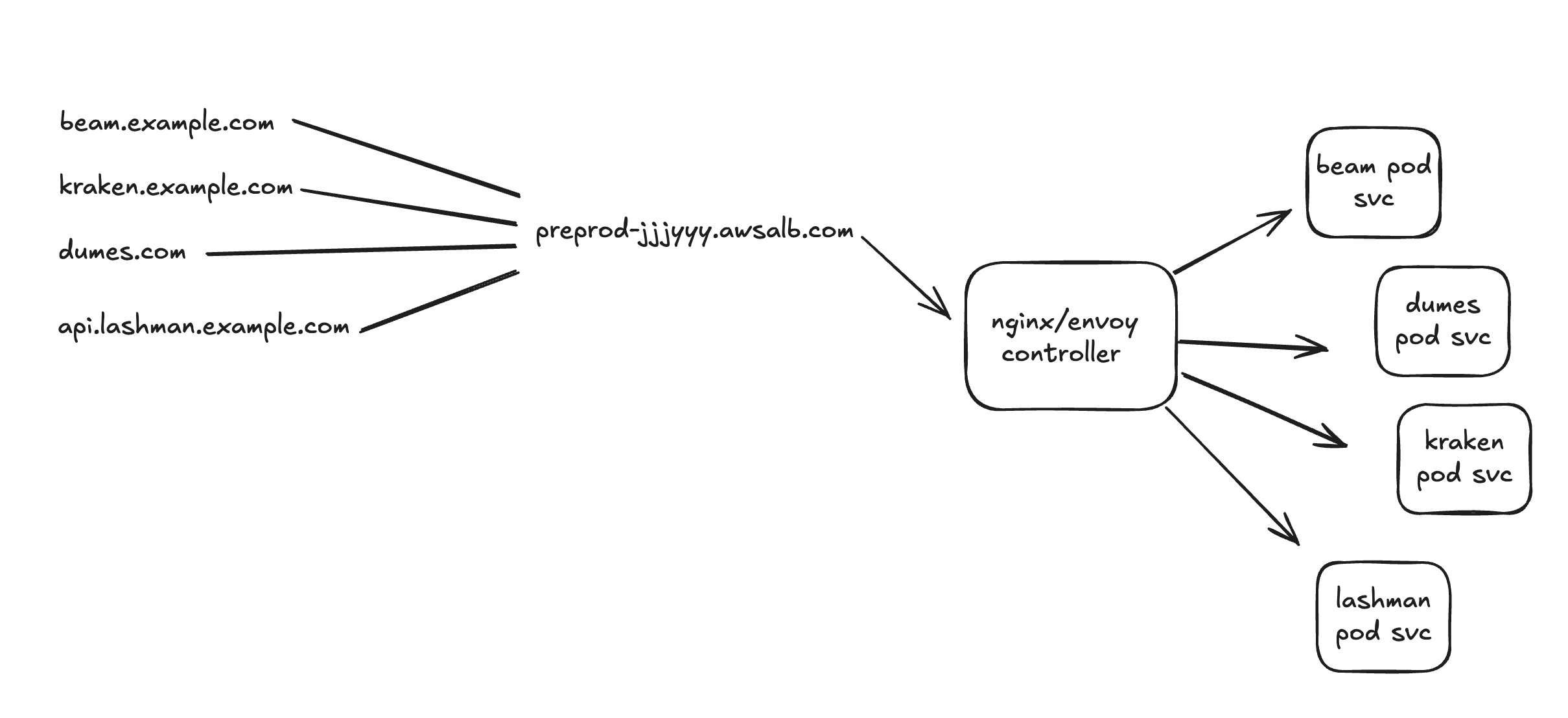
Another place money quietly disappears is ALB sprawl. It is common to see staging environments running five, eight, sometimes ten Application Load Balancers
one per service or per deployment. Each one is sitting there billing you hourly whether it is serving traffic or not.
You do not need that. A single ALB can handle all your routing if you put Nginx or an Envoy Gateway in front of your services.
The ALB terminates TLS and forwards traffic to the gateway, the gateway handles path-based or host-based routing to whichever pod or service needs it.
You can attach multiple custom domains to the same ALB using SNI, so there is no reason a multi-service, multi-domain environment needs more than one.
In production you may want a second ALB for isolation between public-facing and internal traffic, but even that is a deliberate choice, not a default.
In non production environments there is almost never a justification for more than one.
The pattern is straightforward: ALB → Nginx/Envoy → services. Everything else is overhead you are paying for without getting anything back.
Instance Optimization
Use one large instance instead of multiple small instances to get the most out of your resources and reduce overhead.
Do You Really Need Kubernetes?
Most times, you don't need a complex orchestrator like Kubernetes and the overhead that comes with it. A simple EC2 instance running your containers with WUD (What's Up Docker?) is often enough.
WUD is a popular open-source, self-hosted DevOps dashboard designed to track, monitor, and notify you about upstream updates for your running Docker containers.
Pair that with a tool like Vector exporter on BetterStack to export your app logs, and you have a solid, highly cost-effective deployment without the EKS cluster fee and management burden.
Kubernetes & Spot Instances
Enable Spot instances to save drastically on compute. If you do use Kubernetes:
- Use Graviton nodes (they are cheaper than AMD).
- Enable Karpenter to provision and manage your spot nodes.
Environment Scheduling
Downsize your preprod environments during down hours and spin them back up during work hours.
Serverless for Intermittent Workloads
Have a crucial workload, like a video processor? Why waste an instance when you won't be using it all the time? Move it to a Lambda function and allow your app to call the function to process it. Its cold boot is even faster than EKS cronjobs and co.
VPC Endpoints for S3 & ECR
Using VPC Endpoints so that traffic from private subnets doesn't go through a NAT Gateway, avoiding heavy NAT data processing charges (especially when pulling large Docker images).
- S3 Gateway Endpoints are completely free. Since ECR image layers are actually stored in S3, this is a must-have to avoid NAT costs on image pulls.
- ECR Interface Endpoints have a small hourly cost but are much cheaper than paying NAT data charges if you are pulling images frequently.
EBS & Storage Optimization
- EBS Volume Right-Sizing: Upgrade your volumes from
gp2togp3.gp3is cheaper per GB, and it lets you control IOPS and throughput independently of storage size. This means there is no need to overprovision storage just to meet performance targets. - Snapshot and AMI Cleanup: EBS snapshots and old AMIs accumulate quietly over time and can silently drive up costs. Implement Data Lifecycle Manager (DLM) policies to automatically prune old snapshots and deregister obsolete AMIs.
Database Optimization
Using Graviton instances for managed databases (RDS, ElastiCache) for better price-to-performance.
Automatically stopping non-production RDS instances during off-hours (similar to the environment scheduling).
Conclusion
Cutting cloud costs isn't just about turning things off; it's about smart architectural choices and using the right infrastructure tools.
Whether you're swapping an expensive NAT Gateway for an fck-nat instance or moving idle workloads to serverless, these changes can dramatically reduce your AWS burn rate and extend your startup's runway.
Start small, right-size your resources, and build cost-awareness into your engineering culture.
Till next time, Peace be on you 🤞🏽