Three agents, one bucket, three access points

Three agents share one bucket as a workspace. Agent A writes under agents/a/. Agent B gets prompt-injected and tries to overwrite agents/a/report.md. If every agent mounts the same S3 Files root with the same IAM role, that write succeeds. The model did not need a new exploit. It needed a filesystem and a confused deputy (a helper that acts with too much power on someone else's behalf).
The fix I want in production is two controls that close different paths:
- Amazon S3 Files access points with roots that do not overlap, so the NFS mount Agent B sees cannot leave its tree.
- AWS STS
GetScopedCredentials, so the temporary credentials Agent B holds cannotPutObjectinto Agent A's prefix over the S3 API.
Access points alone are not enough. Scoped STS alone is not enough if the agent still has a mount that sees the whole tree. Pair them.
Related:
- Don't put the token in the agent
- Agent-on-agent: when your bot becomes the payload
- From STRIDE and ATT&CK to ATLAS, OWASP LLM, and MAESTRO
What others already said (and this post's angle)
AWS already wrote the building blocks:
- The AWS Security Blog on
GetScopedCredentialscovers agent and multi-tenant prefix scoping, CLI shape, recursive scope-down, and CloudTrail fields. - The AWS Compute Blog on AgentCore + S3 Files walks document investigation with mount IAM and case-folder checks below the app.
- AgentCore filesystem docs define how S3 Files access points attach to runtimes (VPC, port 2049,
s3files:AccessPointArn).
Third-party writeups mapped the STS surface: eCorpIT summarized parameters and AssumeRole trade-offs; thesecguy posted a short CLI sketch; ibreak.software poked abuse edges (AssumeRole escape if the parent still has it, CloudTrail join on accessKeyId).
This post is not another API tour. It is the production threat I keep reviewing: a shared workspace, multi-agent least privilege, mount path plus API path, and how far prompt injection can reach. Architecture and what you must prove in logs. No private lab dump. Where I cite CloudTrail shape, it comes from the AWS IAM / Security Blog docs, not from inventing a run.
The unsafe pattern
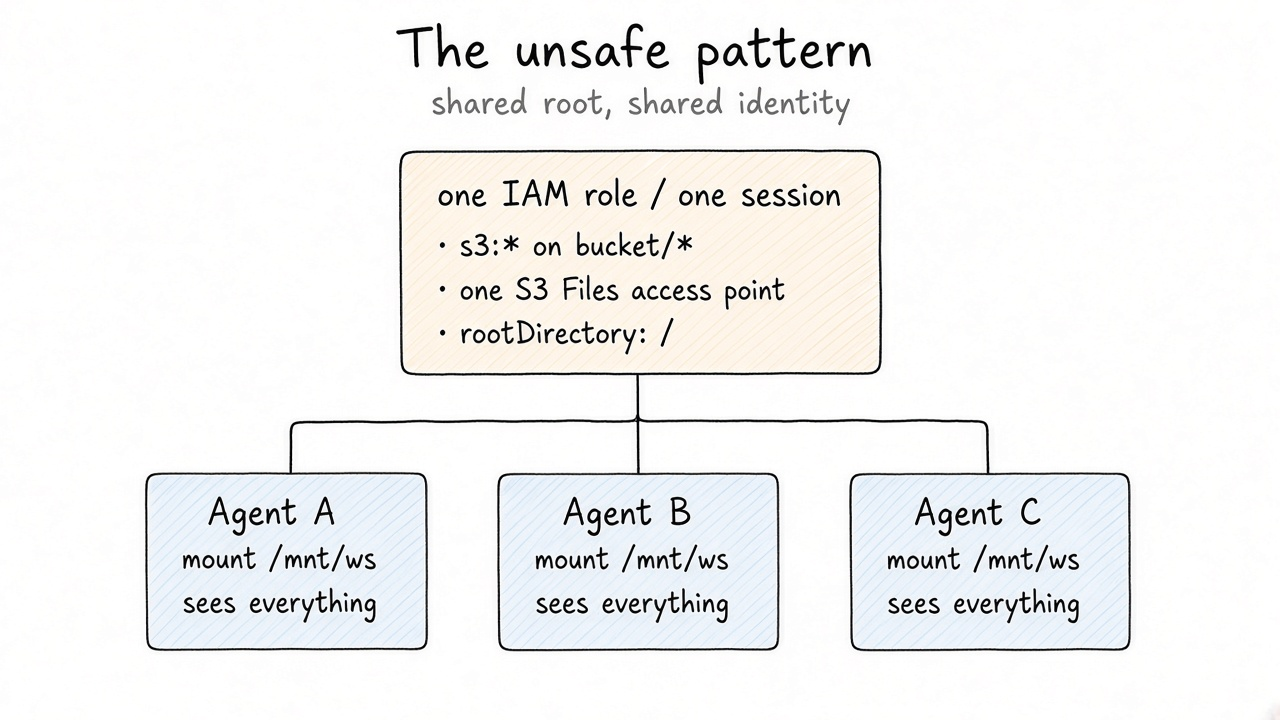
One IAM role, one access point rooted at /. Every agent mounts /mnt/ws and sees the whole tree.
Product likes this. One bucket. One mount. Agents hand off with open() / write() instead of custom S3 SDK glue. The Storage Blog even ships a five-stage pipeline that way on purpose.
Security problem: the workspace is also the place a confused deputy can hurt you. Untrusted ticket text, tool output, or a nested helper (same family as agent-on-agent) steers Agent B to:
open("/mnt/ws/agents/a/secrets.env")and paste it into a "status" message- overwrite
agents/a/out.jsonwith attacker-shaped data the next agent will trust - call
s3.PutObjectonagents/a/...if the role still has bucket IAM, even when the mount root looks narrow
A container or sandbox around the agent does not shrink an IAM role that already covers bucket/*, or an access point rooted at /. How far damage can go is set by the role and the access point prefix, not by the process edge. Putting the durable key in the agent process is a separate miss (don't put the token in the agent). Here the miss is authority that is too wide for the task, whether the key lives in the agent or in a broker that still mints fat sessions.
Control design: three agents, three access points, scoped STS
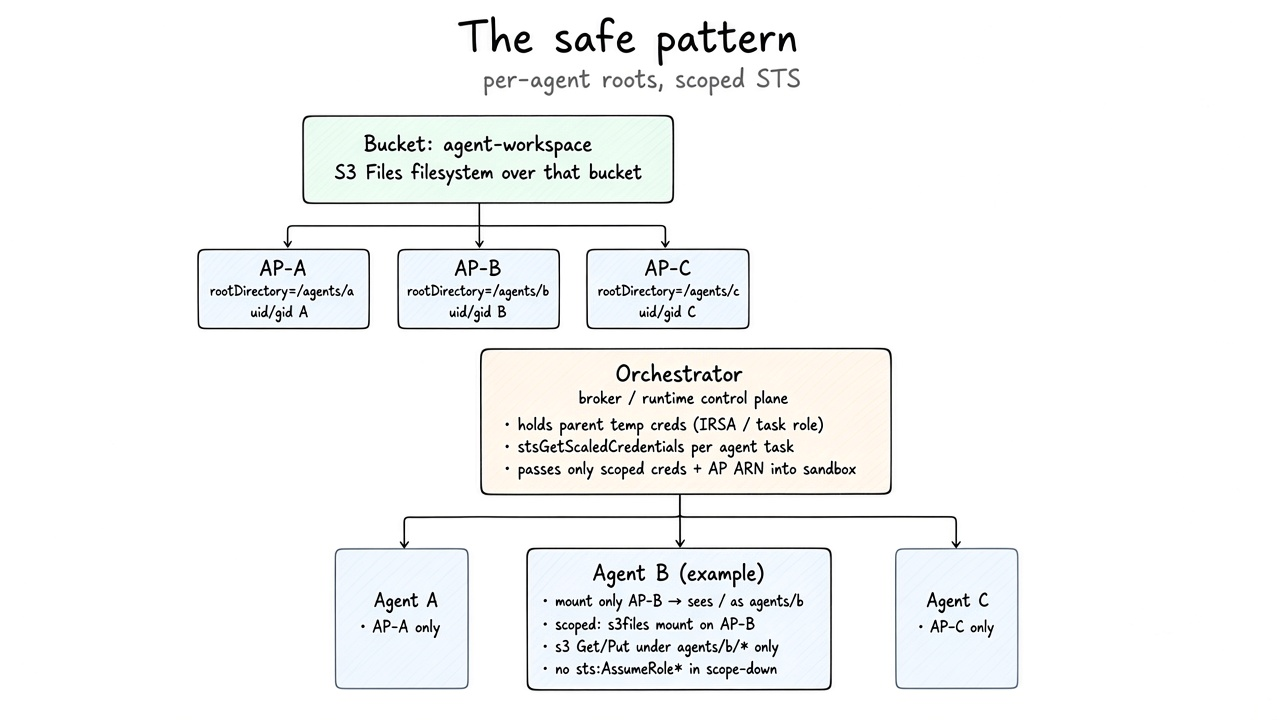
One bucket, three access points, scoped STS per task. Agent B only mounts AP-B and only holds creds that can touch agents/b/*.
Two layers, one job each:
- Mount isolation (S3 Files). Access point
rootDirectoryandposixUserlimit what the NFS client can name. AgentCore (and EC2/ECS/Lambda mounts) attach withs3files:ClientMount/ClientWriteconditioned ons3files:AccessPointArn. See AgentCore filesystem configurations and How S3 Files works with IAM. - API isolation (
GetScopedCredentials). The scope-down policy intersects with the parent session. Permissions can only shrink. The principal ARN, role session name, tags, and source identity stay the same. See GetScopedCredentials API and Permissions for GetScopedCredentials.
AssumeRole vs GetScopedCredentials
AssumeRole with a session policy still works. Many shops already have one role per agent. Use that when each agent must show up as a different principal in CloudTrail.
GetScopedCredentials fits better when you already hold a parent temporary session and you need child credentials for one task. You do not write new trust policies. You do not replace earlier session policies. You also skip the role-chaining one-hour cap.
The other hard difference: scope-down layers stack. AssumeRole session policies replace. AWS documents that clearly.
Short rule I use: different principal in the trail means per-agent roles. Same orchestrator identity, but the task must not inherit every tool permission, means scoped STS.
IAM / STS / S3 Files specifics
Parent role (orchestrator / broker)
Needs enough to mount and mint, not enough for every agent forever:
{
  "Version": "2012-10-17",
  "Statement": [
    {
      "Sid": "MintScopedSessions",
      "Effect": "Allow",
      "Action": "sts:GetScopedCredentials",
      "Resource": "*"
    },
    {
      "Sid": "ManageAgentTrees",
      "Effect": "Allow",
      "Action": ["s3:GetObject", "s3:PutObject", "s3:DeleteObject", "s3:ListBucket"],
      "Resource": [
        "arn:aws:s3:::agent-workspace",
        "arn:aws:s3:::agent-workspace/agents/*"
      ]
    },
    {
      "Sid": "MountAnyAgentAccessPoint",
      "Effect": "Allow",
      "Action": [
        "s3files:ClientMount",
        "s3files:ClientWrite",
        "s3files:GetAccessPoint"
      ],
      "Resource": "arn:aws:s3files:REGION:ACCOUNT:file-system/FILE_SYSTEM_ID",
      "Condition": {
        "ArnLike": {
          "s3files:AccessPointArn": "arn:aws:s3files:REGION:ACCOUNT:file-system/FILE_SYSTEM_ID/access-point/*"
        }
      }
    }
  ]
}
The parent can see the whole tree. That is fine if the parent never enters the agent sandbox. Agents never receive the parent credentials.
Scope-down policy for Agent B (pass to GetScopedCredentials)
Keep it under 2,048 characters. Include every dependent action the task needs. If the agent must call GetScopedCredentials again for a grandchild, allow sts:GetScopedCredentials in this layer too (AWS recursive rule).
{
  "Version": "2012-10-17",
  "Statement": [
    {
      "Sid": "MountOnlyB",
      "Effect": "Allow",
      "Action": [
        "s3files:ClientMount",
        "s3files:ClientWrite",
        "s3files:GetAccessPoint"
      ],
      "Resource": "arn:aws:s3files:REGION:ACCOUNT:file-system/FILE_SYSTEM_ID",
      "Condition": {
        "ArnEquals": {
          "s3files:AccessPointArn": "arn:aws:s3files:REGION:ACCOUNT:file-system/FILE_SYSTEM_ID/access-point/ap-agent-b"
        }
      }
    },
    {
      "Sid": "S3OnlyAgentBPrefix",
      "Effect": "Allow",
      "Action": ["s3:GetObject", "s3:PutObject", "s3:AbortMultipartUpload"],
      "Resource": "arn:aws:s3:::agent-workspace/agents/b/*"
    },
    {
      "Sid": "ListOnlyAgentB",
      "Effect": "Allow",
      "Action": "s3:ListBucket",
      "Resource": "arn:aws:s3:::agent-workspace",
      "Condition": {
        "StringLike": { "s3:prefix": ["agents/b/*"] }
      }
    }
  ]
}
CLI shape (regional endpoint; the API is not on the STS global endpoint):
aws sts get-scoped-credentials \
  --region us-east-1 \
  --policy file://agent-b-scope.json \
  --duration-seconds 900 \
  --scoped-session-description "agent-b-task-case-4421"
Pass only the returned AccessKeyId / SecretAccessKey / SessionToken into Agent B's environment or SDK default chain. Prefer minting inside a broker that the agent calls (credential stays off the model process). If you must hand credentials to a sandbox, hand the scoped set, never the parent.
Deny-list style (Allow + NotAction for sts:AssumeRole*, s3:DeleteBucket, and similar) is documented for "keep most permissions, strip the foot-guns." For shared workspaces I prefer an allow-list per prefix. A deny-list that forgets s3:PutObject on agents/a/* still loses.
One access point per agent
Each agent gets its own access point on the same S3 Files filesystem. Set rootDirectory.path to /agents/a (or /agents/b, /agents/c). Set posixUser to match the container UID/GID (often 1000:1000 for AgentCore). Roots that do not overlap are the mount-side isolation the Storage Blog points at when security requirements grow past a shared pipeline identity.
How Agent B's overwrite attempt dies
- On the mount. Agent B's view of
/isagents/b. A write to/agents/a/report.mdis not a path that exists under that root. Path walk escapes fail at the access-point boundary. - On the S3 API. Even if the model invents
put_object(Bucket=..., Key="agents/a/report.md"), the scope-down policy does not allow that resource. Effective permission is the intersection of parent and every scope-down layer. The call is denied. - On prompt injection. Injection can still make Agent B do anything inside
agents/bfor up toDurationSeconds. Scoped STS shrinks how far damage can go. It does not make the model trustworthy. Pair with short TTL, noAssumeRole*in the scope, and brokered tools for money-moving or cross-prefix actions.
How to prove it in CloudTrail
AWS documents the event shape. Use that when you check that the pattern works.
- Find the mint.
eventSource=sts.amazonaws.com,eventName=GetScopedCredentials. Make sure thatrequestParameters.policymatches the agent prefix you intended. Make sure thatscopedSessionDescriptionnames the task (this field exists so you can label purpose in the trail). Make sure that you seeresponseElements.scopedPoliciesCountand the newresponseElements.credentials.accessKeyId. - Join child activity. Later S3 or S3 Files calls keep the same session ARN / principal id as the parent. The field that changes is
userIdentity.accessKeyId. Join child events to the mint event on that key. If you only group by role session ARN, Agent B and the orchestrator look identical. That is identity preservation, not a bug. - Expect AccessDenied on cross-prefix. Reproduce once in a non-prod account: scoped Agent B credentials attempt
GetObject/PutObjectonagents/a/.... You want AccessDenied in the trail (or in SDK errors), not silence. - Revocation. Scoped credentials inherit
aws:TokenIssueTimefrom the parent. Revoking active sessions on the role hits parent and children together. You cannot revoke a scoped child alone. Plan kill switches at the parent session. - Do not paste live
sessionTokenvalues into tickets or blogs. CloudTrail can carry credential material inresponseElementsfor STS. Treat trails as sensitive.
Things that still bite you
POSIX on the mount is not the S3 API. The S3 Files POSIX docs say POSIX does not restrict direct S3 API access. If the agent still holds fat IAM on the bucket, the SDK walks past the access-point root.
Mount writers and S3 API readers also disagree on timing. AgentCore is close-to-open for NFS clients. Bucket-side readers get S3 eventual consistency. A sibling that reads via the API can lag the mount. Handoffs on the mount, or accept the lag.
If any scope-down layer still allows sts:AssumeRole*, a steered agent can jump to a wider role. Strip it unless you mean to broker that hop.
Putting scoped keys in the agent process still loses to an env dump inside the TTL. Prefer brokered tool calls. Scoped STS shrinks the keyring. It is not a substitute for keeping the keyring off the model.
Inline scope-down tops out at 2,048 characters and three layers per session. Some services reject scoped credentials. See the IAM page. That page and the Security Blog post also cover the other launch gotchas (KMS caches, same-account resource policies, regional STS, request quota).
What I check when a PR gives an agent bucket access
When a PR wires an agent into the shared workspace, I open the mount config and the IAM the task role gets. The question is simple: can Agent B still touch Agent A's tree?
I look for one S3 Files access point per agent (or per trust domain), with a rootDirectory that does not overlap a sibling. The execution or task role that mounts must condition s3files:ClientMount / ClientWrite on that access point ARN. A shared access point rooted at / is an automatic reject for me.
I look for the orchestrator minting GetScopedCredentials per task: allow-listed prefix plus mount actions only, and the agent never receives the parent credentials. If the scope still allows sts:AssumeRole*, I reject the PR unless there is a named, audited reason for that hop.
In CloudTrail I want mint events whose policy matches the intended prefix and a scopedSessionDescription that names the task. I also want detections for unexpected mint policies, missing descriptions, AccessDenied spikes on cross-prefix S3 calls, and a child accessKeyId hitting a foreign prefix.
TTL for untrusted or prompt-exposed agents stays in minutes, not hours. And I accept the boring limits up front: mount-to-S3 sync lag, and whatever services sit on the unsupported list for scoped credentials. If the agent's tools need those services, this pattern is the wrong fit until you redesign the tool path.
Conclusion
Shared S3 Files workspaces are the right product shape for multi-agent handoffs. They are also a classic confused-deputy filesystem if every agent mounts the same root under the same fat session.
Three agents, one bucket, three access points stops the mount walk. GetScopedCredentials stops the S3 API walk into a sibling tree. Together they shrink how far prompt injection can reach to the task prefix and the clock you set. They do not replace brokered egress, tool policy, or threat modeling. They are the IAM half of a workspace you can defend.