SBOM Generation Is Not Enough: What to Actually Do With It

Every team generating an SBOM and calling it done is doing the security equivalent of buying a fire extinguisher, putting it in the closet, and never reading the label.
The Sha Hulud, Mini Sha Hulud, SolarWinds breach. XZ Utils. Log4Shell. Each one hit organizations that, on paper, had security programs. The pattern is the same: a dependency you did not think twice about becomes the vector. Your SBOM tells you what is in the box. It does not automatically tell you what is rotting.
Generating the document is table stakes. The real question is what you actually do with it.
What an SBOM Actually Is
A Software Bill of Materials is a structured, machine readable inventory of every component inside a piece of software: libraries, frameworks, transitive dependencies, the whole graph. The two dominant formats are CycloneDX and SPDX.
Both capture:
- Package name and version
- PURL (Package URL) a standardized identifier for locating the package in its ecosystem
- Licenses declared by each package
- Dependency relationships (what depends on what)
- Optionally: checksums, supplier info, timestamps
An SBOM generated at build time is a snapshot of exactly what shipped. It is the foundation for every downstream security and compliance question.
Why "Generate and File" Is a Dead End
Most teams that adopt SBOMs stop at generation. The CI pipeline runs Syft, an SBOM drops into an artifact store, and that is where it lives until a compliance auditor asks for it.
This is the wrong loop.
Supply chain attacks work precisely because the gap between "a vulnerability exists" and "your team knows it affects your system" is measured in days or weeks, not hours. A static SBOM that you generated three months ago and never queried is not a security control. It is a checkbox.
The actual value comes from the query layer on top.
| What you generate | What you need to do with it |
|---|---|
| Dependency inventory | Query it for known CVEs on every merge |
| License list | Enforce license policy as a gate |
| Dependency graph | Track dependency age and flag abandoned packages |
| Transitive tree | Identify indirect vulnerabilities, not just direct ones |
Generating the SBOM: Syft via GitHub Actions
Because your code already sits in GitHub, GitHub Actions is the natural control plane for SBOM generation across all your repositories. You want generation to be an automatic, invisible part of the build process.
Syft
Syft from Anchore is purpose-built for SBOM generation. It supports container images, directories, and individual binaries. It outputs CycloneDX, SPDX, and its own native format.
# Install
curl -sSfL https://raw.githubusercontent.com/anchore/syft/main/install.sh | sh -s -- -b /usr/local/bin

# Generate from a container image
syft your-image:latest -o cyclonedx-json > sbom.json

# Generate from a local Go or Node project directory
syft dir:. -o cyclonedx-json > sbom.json

# Generate SPDX format instead
syft your-image:latest -o spdx-json > sbom.spdx.json
Syft picks up packages from package managers (go.sum, package-lock.json, requirements.txt, pom.xml, Gemfile.lock, Cargo.lock) and from installed packages inside container images (dpkg, rpm, apk).
# See what ecosystems it detected
syft your-image:latest -o table
You will get output like:
NAME                VERSION         TYPE
alpine-baselayout   3.4.3-r1        apk
busybox             1.36.1-r2       apk
github.com/gin-gonic/gin  v1.9.1   go-module
github.com/aws/aws-sdk-go v1.44.0  go-module
By hooking Syft into your GitHub Actions workflow on every push or release tag, you ensure that every shipped artifact has a corresponding, versioned SBOM sitting right next to it in your artifact store.
Querying for CVEs
Once you have an SBOM, do not sit on it. Query it.
Grype Against a Syft SBOM
Grype from Anchore reads Syft SBOMs directly and matches packages against the Grype vulnerability database (NVD, GitHub Advisories, OSV, and ecosystem-specific sources).
# Install Grype
curl -sSfL https://raw.githubusercontent.com/anchore/grype/main/install.sh | sh -s -- -b /usr/local/bin

# Scan the SBOM you generated
grype sbom:./sbom.json

# Filter to only HIGH and CRITICAL
grype sbom:./sbom.json --fail-on high

# Output as JSON for parsing
grype sbom:./sbom.json -o json > vuln-report.json
The output tells you the package, installed version, fixed version, CVE ID, and severity. The --fail-on flag is the gate: set it in CI and the build fails if a HIGH or CRITICAL exists without a fix.
NAME                    INSTALLED   FIXED-IN   TYPE        VULNERABILITY   SEVERITY
github.com/gin-gonic/gin  v1.9.1   v1.9.2     go-module   CVE-2023-29401  HIGH
stdlib                    go1.21.0  go1.21.6   go-module   CVE-2023-45285  HIGH
This is the feed that goes into Slack alerts, Jira tickets, or whatever your team actually reads.
Querying for License Violations
SBOM-based license checking is one of the most underused capabilities teams sleep on. A transitive dependency that ships under GPL-3.0 inside a proprietary product is a legal problem, not a performance problem.
Querying License Data from a Syft SBOM
A Syft CycloneDX JSON SBOM includes license info per component. You can query it directly with jq:
# List all unique licenses found
cat sbom.json | jq -r '
  .components[]
  | .licenses[]?.license.id // .licenses[]?.license.name
' | sort -u

# Find any GPL variants
cat sbom.json | jq '
  .components[]
  | select(
      .licenses[]?.license.id
      | strings
      | test("GPL"; "i")
    )
  | {name: .name, version: .version, licenses: [.licenses[]?.license.id]}
'
If your build pipeline generates the SBOM and immediately pipes it through this check, you catch a GPL transitive dependency before it ships, not after the legal team gets involved.
Querying for Dependency Age
CVE coverage is obvious. Dependency age is the question most teams never ask.
An abandoned package - one with no commits in 24 months, no maintainer response to issues, no recent release - is a liability even if it has no current CVE. It means:
- No one is patching it when the next vulnerability lands
- You may be pinned to a version with a known issue that was never disclosed as a CVE
- The ecosystem has likely moved on
Pulling Age Data from the SBOM + Registry APIs
A Syft SBOM gives you package names, versions, and PURLs. The PURL is the key to pulling metadata from ecosystem registries.
For a Go module:
# Extract all Go module PURLs from the SBOM
cat sbom.json | jq -r '
  .components[]
  | select(.purl | startswith("pkg:golang"))
  | .purl
'
For an npm package named lodash at version 4.17.21, the PURL is pkg:npm/[email protected]. You can hit the npm registry:
# Get latest version and release dates for a package
curl -s https://registry.npmjs.org/lodash | jq '{
  latest: .["dist-tags"].latest,
  modified: .time.modified,
  created: .time.created
}'
For PyPI:
curl -s https://pypi.org/pypi/requests/json | jq '{
  latest: .info.version,
  release_date: .urls[0].upload_time
}'
A Practical Age-Check Script
Here is a shell script that reads a Syft JSON SBOM, pulls npm packages, and flags anything not updated in over 24 months:
#!/bin/bash
# check-dep-age.sh - flags npm packages not updated in 2+ years
SBOM_FILE=${1:-sbom.json}
THRESHOLD_MONTHS=24
NOW=$(date +%s)

echo "Checking npm dependency age from $SBOM_FILE"
echo "---"

cat "$SBOM_FILE" | jq -r '
  .components[]
  | select(.purl | startswith("pkg:npm"))
  | .name
' | sort -u | while read -r pkg; do
  DATA=$(curl -sf "https://registry.npmjs.org/$pkg" 2>/dev/null)
  if [ -z "$DATA" ]; then
    echo "SKIP $pkg (registry lookup failed)"
    continue
  fi

  MODIFIED=$(echo "$DATA" | jq -r '.time.modified // empty')
  if [ -z "$MODIFIED" ]; then
    echo "UNKNOWN $pkg (no modified date)"
    continue
  fi

  MOD_EPOCH=$(date -j -f "%Y-%m-%dT%H:%M:%S" "${MODIFIED%%.*}" +%s 2>/dev/null || date -d "${MODIFIED%%.*}" +%s 2>/dev/null)
  MONTHS_AGO=$(( (NOW - MOD_EPOCH) / 2592000 ))

  if [ "$MONTHS_AGO" -gt "$THRESHOLD_MONTHS" ]; then
    echo "STALE [$MONTHS_AGO months] $pkg"
  else
    echo "OK    [$MONTHS_AGO months] $pkg"
  fi
done
Run it:
chmod +x check-dep-age.sh
./check-dep-age.sh sbom.json
Output:
Checking npm dependency age from sbom.json
---
STALE [38 months] request
STALE [31 months] mkdirp
OK    [4 months]  axios
OK    [2 months]  express
request has been officially deprecated. If it shows up in your SBOM, you are carrying dead weight.
Catching Dependency Confusion
Dependency confusion attacks occur when a threat actor figures out the name of your private, internal packages (e.g., @mycompany/auth-utils) and publishes a malicious package with the exact same name to a public registry like npm or PyPI, but with an absurdly high version number (e.g., 99.0.0).
Poorly configured package managers will see the public version, assume it is an upgrade, and pull the malware into your build.
Your SBOM is the perfect tool to detect this before it ships.
Since Syft records the PURL for every package, you know exactly what is in your build.
You can write a script that looks for your internal namespaces in the SBOM, and then queries the public registry to see if a package by that name actually exists there. If it does and you did not explicitly open-source it, you are likely being targeted.
#!/bin/bash
# check-confusion.sh - flags internal packages that exist on the public registry
SBOM_FILE=${1:-sbom.json}
INTERNAL_ORG="@acmecorp"

echo "Checking for dependency confusion for $INTERNAL_ORG..."

cat "$SBOM_FILE" | jq -r '
  .components[]
  | select(.purl | startswith("pkg:npm/'"$INTERNAL_ORG"'"))
  | .name
' | sort -u | while read -r pkg; do
  HTTP_CODE=$(curl -s -o /dev/null -w "%{http_code}" "https://registry.npmjs.org/$pkg")
  if [ "$HTTP_CODE" == "200" ]; then
    echo "WARNING: Internal package $pkg exists on the public npm registry!"
  else
    echo "Safe: $pkg is not public."
  fi
done
If that script fires, you fail the pipeline immediately.
Putting It Together: CI Pipeline
The pattern that makes all of this real is automation. A one-off scan is not a control. A pipeline gate is.
# .github/workflows/sbom-scan.yaml
name: SBOM Security Gate

on:
  pull_request:
  push:
    branches: [main]

jobs:
  sbom-scan:
    runs-on: ubuntu-latest
    steps:
      - uses: actions/checkout@v4

      - name: Install Syft
        run: curl -sSfL https://raw.githubusercontent.com/anchore/syft/main/install.sh | sh -s -- -b /usr/local/bin

      - name: Install Grype
        run: curl -sSfL https://raw.githubusercontent.com/anchore/grype/main/install.sh | sh -s -- -b /usr/local/bin

      - name: Generate SBOM
        run: syft dir:. -o cyclonedx-json > sbom.json

      - name: Upload SBOM as artifact
        uses: actions/upload-artifact@v4
        with:
          name: sbom
          path: sbom.json

      - name: Scan for CVEs (fail on HIGH+)
        run: grype sbom:./sbom.json --fail-on high

      - name: Check Dependency Age
        run: ./scripts/check-dep-age.sh sbom.json
        continue-on-error: true  # informational for now
Two gates in one pipeline:
- CVE gate - hard fail on HIGH or CRITICAL with a fix available
- Age check - informational until you decide your stale threshold
The SBOM is uploaded as a build artifact on every run, so you have a versioned record of what shipped.
Tying it to Container Signing
Generating and querying the SBOM is half the battle. The other half is ensuring the SBOM and the container image itself have not been tampered with after the build.
This ties naturally into container signing. By using tools like Cosign, you can cryptographically sign your container image and attach the SBOM as an in-toto attestation.
# Attach and sign the SBOM to the image
cosign attest --predicate sbom.json --type cyclonedx your-image:latest
When you do this, your Kubernetes admission controller can verify the signature before the container ever runs, guaranteeing that the image was built by your CI pipeline and that the SBOM exactly matches what was deployed.
What This Catches That Pure Scanning Misses
Running a scanner against your image is not the same as scanning an SBOM. The distinction matters.
A direct scanner sees what it can resolve at scan time - packages installed in the image layer, go.sum entries, package-lock.json. It misses:
- Vendored code: copied-in libraries with no package manager entry
- Compiled artifacts: stripped binaries that the scanner cannot resolve to a package
- Multi-stage build artifacts: things compiled in an earlier layer but excluded from the final image
A well-generated SBOM built at compile time, before stripping, captures the full picture. That is why you generate it as part of the build, not after the fact.
The Actual Threat Model
Supply chain attacks do not announce themselves. The XZ Utils backdoor lived in the open-source repository for months. The compromised npm packages that steal credentials are often transitive - you did not install them, your dependency's dependency did.
Your SBOM is the map. CVE scanning is checking if known roads on that map are blocked. License scanning is checking if you are allowed to drive those roads. Dependency age is checking if the road was abandoned and nobody noticed.
None of these are theoretical. Each one has an associated real-world incident.
| Risk | What it looks like | What catches it |
|---|---|---|
| Known vulnerability in a dep | Log4Shell in your Java app's transitive deps | CVE query on SBOM via Grype |
| License contamination | GPL library pulled in via transitive dep | License scan on SBOM via Syft JSON queries |
| Abandoned package backdoor | Maintainer gone, repo taken over, malicious release | Dependency age check + integrity pinning |
| Typosquatting | lodahs instead of lodash in package-lock | SBOM PURL validation, registry cross-check |
Continuous Scanning: When a CVE Lands After You Already Shipped
The CI pipeline gate on pull requests and pushes covers new code. It does not cover what happens on a Tuesday at 2am when a zero-day drops against a library you shipped six weeks ago.
Log4Shell is the clearest example. The CVE hit in December 2021. It affected Java applications that had already been deployed - applications that passed every scan they ever ran because the vulnerability did not exist in any database when they shipped. The artifact was clean. The world changed.
This is the gap that a scheduled scan closes. You re-run your SBOM against the latest vulnerability database on a cron, without a new build, and you get an alert the moment a match lands.
The Continuous Scanning Workflow
The trick is separating the SBOM generation (which happens at build time, attached to a commit) from the SBOM scanning (which should happen continuously against the same artifact).
Here is how to wire this up in GitHub Actions:
# .github/workflows/sbom-continuous-scan.yaml
name: Continuous SBOM Scan
on:
schedule:
- cron: '0 6 * * *' # 06:00 UTC daily
- cron: '0 18 * * *' # 18:00 UTC daily - twice a day catches faster CVE publication cycles
workflow_dispatch: # allow manual trigger from the Actions UI
jobs:
continuous-scan:
runs-on: ubuntu-latest
strategy:
matrix:
# scan the SBOM for each environment/service you track
service: [api, frontend, worker]
fail-fast: false # scan all services even if one fails
steps:
- uses: actions/checkout@v4
- name: Install Grype
run: curl -sSfL https://raw.githubusercontent.com/anchore/grype/main/install.sh | sh -s -- -b /usr/local/bin
- name: Update Grype vulnerability database
# Force a fresh DB pull - do not rely on a cached version from a previous run
run: grype db update
- name: Download latest SBOM for ${{ matrix.service }}
uses: dawidd6/action-download-artifact@v6
with:
workflow: sbom-scan.yaml # your build workflow that uploads the SBOM
workflow_conclusion: success
name: sbom-${{ matrix.service }} # must match the artifact name in your build workflow
path: ./sbom
- name: Scan SBOM against latest vuln DB
id: scan
run: |
grype sbom:./sbom/sbom.json \
--fail-on high \
--ignore-fixed \
-o json > scan-results-${{ matrix.service }}.json
continue-on-error: true # capture exit code without stopping the workflow
- name: Parse new findings
id: parse
run: |
CRITICAL=$(cat scan-results-${{ matrix.service }}.json | jq '[.matches[] | select(.vulnerability.severity == "Critical")] | length')
HIGH=$(cat scan-results-${{ matrix.service }}.json | jq '[.matches[] | select(.vulnerability.severity == "High")] | length')
echo "critical=$CRITICAL" >> $GITHUB_OUTPUT
echo "high=$HIGH" >> $GITHUB_OUTPUT
echo "service=${{ matrix.service }}" >> $GITHUB_OUTPUT
- name: Post Slack alert on new findings
if: steps.parse.outputs.critical != '0' || steps.parse.outputs.high != '0'
with:
payload: |
{
"text": ":rotating_light: *SBOM Continuous Scan* found new vulnerabilities in *${{ matrix.service }}*",
"blocks": [
{
"type": "section",
"text": {
"type": "mrkdwn",
"text": ":rotating_light: *Continuous SBOM scan - ${{ matrix.service }}*\nCritical: *${{ steps.parse.outputs.critical }}* | High: *${{ steps.parse.outputs.high }}*\n<${{ github.server_url }}/${{ github.repository }}/actions/runs/${{ github.run_id }}|View scan run>"
}
}
]
}
env:
SLACK_WEBHOOK_URL: ${{ secrets.SLACK_WEBHOOK_URL }}
SLACK_WEBHOOK_TYPE: INCOMING_WEBHOOK
- name: Upload scan results
if: always()
uses: actions/upload-artifact@v4
with:
name: continuous-scan-${{ matrix.service }}-${{ github.run_id }}
path: scan-results-${{ matrix.service }}.json
retention-days: 30
A few things worth explaining in this workflow:
grype db update is not optional. Grype ships with a bundled database but it is not always the latest. On a scheduled workflow that runs against the same SBOM repeatedly, you want the freshest CVE data on every run. Skip this step and you may miss a CVE that was published after the last time the runner's cache was warm.
dawidd6/action-download-artifact lets you pull an artifact from a different workflow run - in this case, the SBOM uploaded by your build pipeline. You are scanning the same artifact that shipped, not regenerating it. That distinction matters: regenerating the SBOM on a cron gives you a snapshot of what your deps look like today, not what actually shipped.
--ignore-fixed filters out vulnerabilities that have no available fix. This reduces noise. On a continuous scan you want to surface things your team can act on, not recount the same unfixable issues that have been sitting in your report for months.
fail-fast: false on the matrix means if the api service scan hits a critical, the frontend and worker scans still run. You get the full picture before the alert goes out.
Scanning Multiple Environments With Different Cadences
Not every service needs the same scan frequency. Production-facing services that process payments or handle PII should be scanned more aggressively than internal tooling.
on:
  schedule:
    # Production services: every 6 hours
    - cron: '0 */6 * * *'
  workflow_dispatch:
    inputs:
      service:
        description: 'Service to scan (leave empty for all)'
        required: false
        default: ''
      environment:
        description: 'Environment (production/staging)'
        required: false
        default: 'production'
You can then use the workflow_dispatch trigger to manually kick a scan the moment a new CVE advisory lands - before the nightly cron runs - which is the right move during an active incident.
Diffing SBOMs to Catch Silent Dependency Changes
Beyond re-scanning the same SBOM, there is value in comparing SBOMs between releases to catch dependency drift - cases where a dependency version changed quietly between two builds.
# Extract package list from two SBOMs and diff them
jq -r '.components[] | "\(.name) \(.version)"' sbom-v1.json | sort > deps-v1.txt
jq -r '.components[] | "\(.name) \(.version)"' sbom-v2.json | sort > deps-v2.txt

diff deps-v1.txt deps-v2.txt
Output:
< axios 1.6.2
> axios 1.7.4
< lodash 4.17.20
> lodash 4.17.21
Lines prefixed with < were removed. Lines prefixed with > were added. This is how you see that axios bumped between two production deploys without a PR review, or that a transitive dependency shifted under you.
In a GitHub Actions step, you can fail the workflow if any new package appears that was not in the previous SBOM, which is a useful gate for supply chain integrity: nothing unexpected should arrive in a production image.
- name: Diff SBOMs and fail on unexpected new packages
  run: |
    jq -r '.components[] | .name' sbom-prev.json | sort > prev-pkgs.txt
    jq -r '.components[] | .name' sbom-curr.json | sort > curr-pkgs.txt
    NEW_PKGS=$(comm -13 prev-pkgs.txt curr-pkgs.txt)
    if [ -n "$NEW_PKGS" ]; then
      echo "New packages introduced:"
      echo "$NEW_PKGS"
      echo "::error::Unexpected new packages in SBOM. Review before merging."
      exit 1
    fi
    echo "No unexpected new packages."
This is particularly useful on release branches where the dependency graph should be locked and stable.
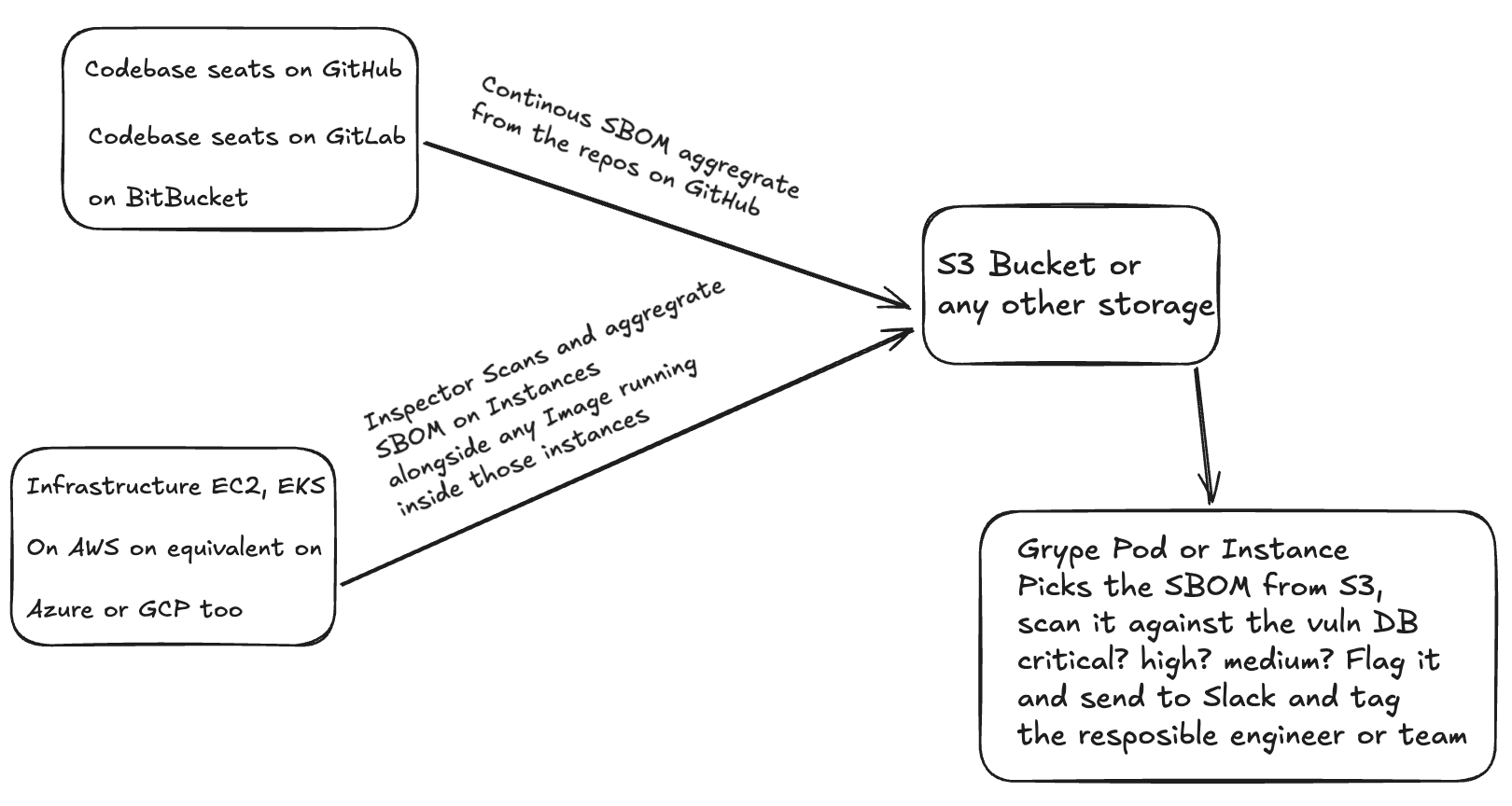
Centralizing and Scaling: S3, Helm, and AWS Inspector
When you scale from a few repositories to a full enterprise environment, keeping SBOMs scattered across GitHub Actions artifacts or local folders stops working. You need a centralized data lake for your supply chain.
Exporting SBOMs from AWS Inspector
If you are running workloads on AWS, you do not necessarily have to rely entirely on your CI/CD pipelines to generate SBOMs for running instances. AWS Inspector can automatically discover EC2 instances and ECR container images and export their SBOMs directly to an Amazon S3 bucket.
This provides a continuous, runtime view of what is actually deployed, which acts as a fantastic secondary check against your build-time SBOMs. Inspector exports these in standard formats (CycloneDX or SPDX), so they plug right into your existing query logic.
Handling Kubernetes and Helm
For Kubernetes clusters managed via Helm, the container images are only half the story. The Helm chart itself - the templates, default configurations, and dependencies on other charts - is part of your supply chain.
A mature approach involves:
- Generating the SBOM of the Helm chart itself (capturing chart dependencies).
- Extracting the container images referenced within the Helm chart and generating SBOMs for those images.
- Keeping both sets of SBOMs tied together to represent the complete deployment package.
The Unified SBOM Data Lake
The endgame for a large organization is shipping all of these SBOMs - from GitHub Actions (build time), from AWS Inspector (runtime), and from Helm deployments - into a unified S3 bucket.
Once your SBOMs are centralized in S3, your continuous scanning logic no longer needs to pull from individual GitHub artifact stores. Instead, a central orchestrator (e.g., an AWS Lambda running Grype, or a dedicated security pipeline) can continuously scan the entire S3 bucket against the latest vulnerability databases. If a zero-day drops, you query the S3 bucket and instantly know every instance, container, and Helm release that is affected across your entire infrastructure.
Conclusion
Generating the SBOM is the first step, not the whole program. The teams that treat SBOM creation as a compliance artifact and never query it are doing the minimum while carrying the full risk.
The loop that actually works:
- Generate at build time with Syft - not after the image is built, during it
- Query for CVEs with Grype, fail the build on HIGH and CRITICAL with available fixes
- Query for licenses, enforce your policy as a gate before anything ships to production
- Check dependency age on a scheduled basis, flag the abandoned packages before they become the next XZ
- Store the SBOM as a versioned artifact and diff it between releases
- Run continuous cron scans against shipped SBOMs so a CVE published at 3am wakes your Slack channel, not your users
The supply chain threat is not going away. The window between a vulnerability being exploited in the wild and your team knowing your system is affected is where incidents happen. Your SBOM, actively queried on a schedule, is how you shrink that window.
Till next time, Peace be on you 🤞🏽
References
- Syft Documentation
- Grype Documentation
- CycloneDX Specification
- SPDX Specification
- OSV Database
- NIST SP 800-161: Supply Chain Risk Management