Trenches Infra: Zero-Latency Staging Routing
When spinning up ephemeral or staging environments on Google Cloud Run, engineers often face a dilemma regarding custom domain mapping. Native Cloud Run mapping is notoriously slow (SSL provisioning can take 15+ minutes), and setting up a full Google Cloud Load Balancer (GCLB) incurs a minimum ~$18/month cost per instance plus complexity overhead.
For a staging environment where velocity and immediate feedback are paramount, neither option is ideal.
This document details a "Trenches" approach: using a Cloudflare Worker as a transparent reverse proxy. This allows us to route a custom subdomain (e.g., staging-api.domain.com) to a Cloud Run URL instantly, while forcing a zero-caching policy to ensure developers always interact with the latest deployment.
The Architecture
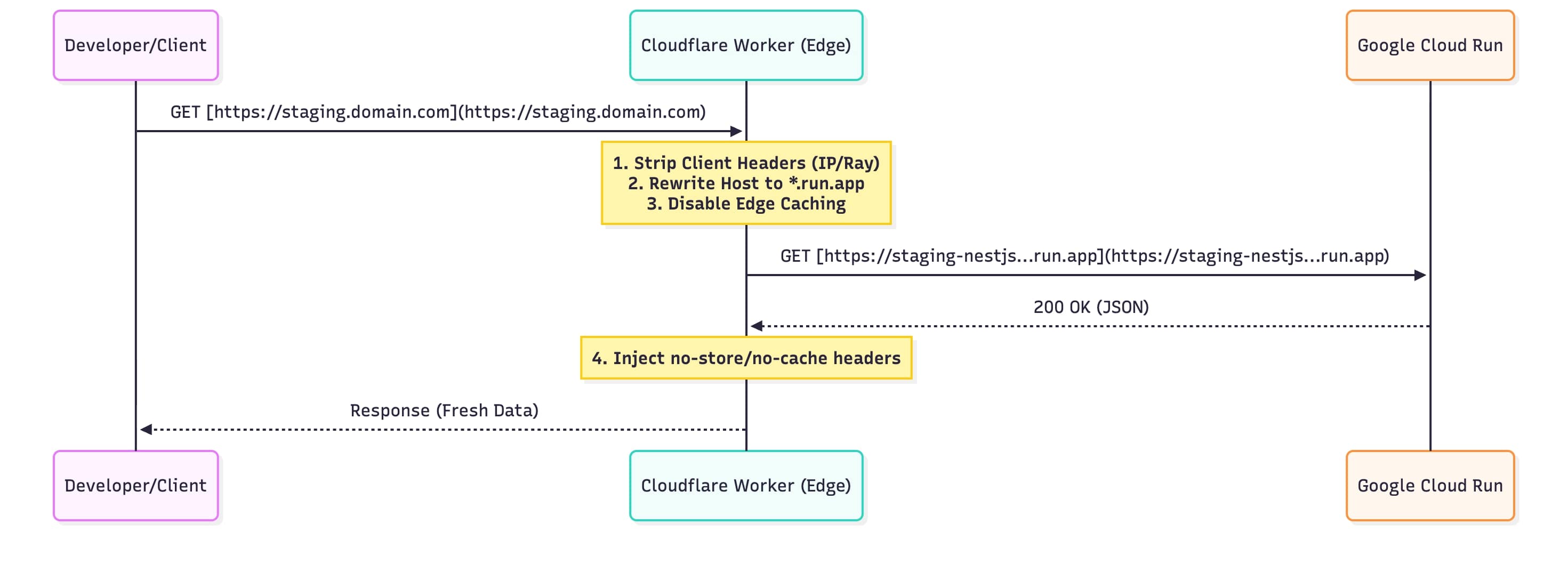
Instead of a heavy load balancer, we use the Edge to rewrite the request headers before they hit Google's infrastructure.
The Implementation
The following Worker script handles the proxying. It is specifically tuned for Staging environments by aggressively stripping caching layers.
Key Technical Decisions:
- Host Header Rewriting: Cloud Run rejects requests if the
Hostheader does not match the generated.run.appdomain. We swap this at the edge. - Aggressive Cache Busting: We utilize
cf: { cacheTtl: -1 }in the fetch request and injectCache-Control: no-storein the response. This prevents Cloudflare, the browser, and intermediate proxies from caching stale staging data. - Header Sanitization: We strip Cloudflare-specific headers (
cf-connecting-ip,cf-ray) before forwarding to the upstream to keep the request cleaner, though this can be adjusted if the upstream needs client IP geolocation.
addEventListener('fetch', event => {
  event.respondWith(handleRequest(event.request))
})

/**
 * Proxies request to Cloud Run while enforcing a strict no-cache policy
 * for staging environments.
 */
async function handleRequest(request) {
  const url = new URL(request.url)

  // The upstream Cloud Run instance address
  const cloudRunHost = 'staging-nestjs-.....-uc.a.run.app'

  // 1. Prepare Headers for Upstream
  const headers = new Headers(request.headers)
  headers.set('Host', cloudRunHost) // CRITICAL: Cloud Run routing requirement

  // Optional: Clean up Cloudflare specific traces if not needed upstream
  headers.delete('cf-connecting-ip')
  headers.delete('cf-ray')

  // 2. Reconstruct the Request
  const newRequest = new Request(`https://${cloudRunHost}${url.pathname}${url.search}`, {
    method: request.method,
    headers: headers,
    body: request.method !== 'GET' && request.method !== 'HEAD' ? await request.blob() : undefined,
  })

  // 3. Fetch from Cloud Run with Edge Caching Disabled
  const response = await fetch(newRequest, {
    cf: {
      cacheTtl: -1, // Force miss
      cacheEverything: false,
      scrapeShield: false,
      mirage: false,
      polish: "off"
    }
  })

  // 4. Sanitize Response Headers for the Client
  const newHeaders = new Headers(response.headers)

  // Enforce browser-side non-caching
  newHeaders.set('Cache-Control', 'no-store, no-cache, must-revalidate, max-age=0')
  newHeaders.set('Pragma', 'no-cache')
  newHeaders.set('Expires', '0')

  // Remove upstream CF headers to avoid confusion
  newHeaders.delete('cf-cache-status')

  return new Response(response.body, {
    status: response.status,
    statusText: response.statusText,
    headers: newHeaders
  })
}
Deployment Strategy
Since this is infrastructure-as-code, deployment should be handled via wrangler.
- Configuration: Ensure your
wrangler.tomltargets the staging environment. - Routes: Map the worker to your desired subdomain (e.g.,
staging-api.yourdomain.com/*). - Deploy:
npx wrangler deploy
Trade-offs & Considerations
- Client IP Visibility: By stripping
cf-connecting-ipand rewriting the Host, the upstream NestJS app might lose context of the original client IP. If your application logic relies on IP rate limiting or geolocation, you should inject theX-Forwarded-Forheader explicitly in thehandleRequestfunction. - Cold Starts: Unlike a GCLB which keeps connections warm, this method is subject to standard Cloud Run cold starts.
- Security: This proxy effectively makes your Cloud Run instance public via the Worker. Ensure your application handles authentication (JWT/OAuth) correctly at the application layer.